
AI Writing10 min read
Skip Copy Paste: AI Email Writing with Ready Prompts
Stop retyping emails. Use AI email writing with ready prompt templates, inbox integrations, and privacy checks. Try AmmarAI's free tier today.
Skip Copy Paste: AI Email Writing with Ready Prompts
Use an AI email writer instead of staring at a blank compose window. An AI email generator can turn a short prompt or a pasted thread into a polished, on-tone draft in seconds, sometimes including subject-line options. Try one prompt on a real email today, but always read it over before you hit send.
TL;DR:
- AI email tools can significantly reduce drafting time, with some claiming up to 87% faster writing, but results depend on testing in your own inbox.
- Using prompts with clear recipients, goals, and tone consistently yields better drafts than vague instructions, especially for repetitive mail types.
- Integration in your inbox through extensions or CRM systems minimizes friction, but always verify facts and avoid auto-sending sensitive or legal content.
- Choice of an AI tool should prioritize inbox compatibility, tone control, language accuracy, and data privacy, with trial drafts clarifying which fits your workflow best.
- Maintain human oversight by reviewing AI-generated content for accuracy and tone, especially in sensitive communication such as legal or confidential emails.
Table of Contents
- What Is AI Email Writing?
- Benefits of Using AI for Email Writing
- How Do AI Email Writers Actually Work?
- Prompt Templates and Ready-to-Use Examples
- Where Do AI Email Tools Run, and Do They Handle Other Languages?
- Is It Safe to Use AI for Business Emails?
- How Do You Choose the Right AI Email Tool?
- AmmarAI as a Practical Starting Point
- What I’ve Learned From Watching AI Email Tools Get Used Badly
- Try AmmarAI’s Email Tools Today
- Sources
What Is AI Email Writing?
AI email writing means feeding a tool a short prompt, a set of bullet points, or an existing thread, and getting back a full draft that matches the tone and purpose you specify. It replaces the “blank page” problem, not the thinking behind the message.
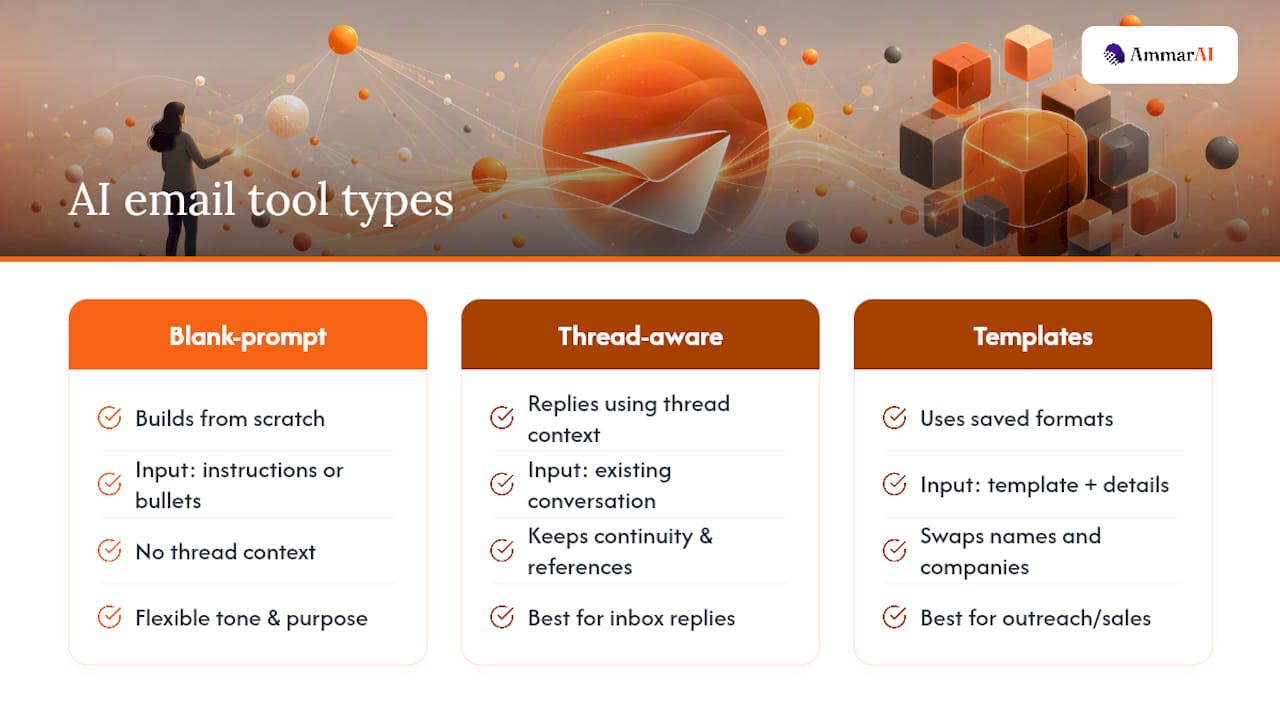
Tools generally fall into three camps. Blank-prompt generators build an email from scratch based on your instructions. Thread-aware assistants read an existing conversation and draft a contextually appropriate reply. Template and personalization engines pull from saved formats and swap in details like a name or company, which is common in outreach and sales sequences.
The best use case is volume: cold outreach batches, recurring status updates, or any message where the structure repeats but the details change.
Benefits of Using AI for Email Writing
The biggest, most immediate benefit is speed. Instead of drafting from zero, you edit a draft that already exists, which cuts the blank-page time to almost nothing.
- Faster drafting: one vendor, WriteMail, markets a claim that its users write emails up to 87% faster, a figure worth treating as a vendor-reported benchmark rather than an independent study.
- Cleaner grammar and structure: most tools catch awkward phrasing and tighten run-on sentences automatically.
- Consistent tone: templates and saved brand-voice settings mean your Monday email sounds like your Friday email.
- Multilingual reach: several tools draft in a dozen or more languages, letting one person handle outreach across markets without a translator.
Vendor claims vary. Treat productivity percentages as marketing copy until you test the tool on your own inbox.
How Do AI Email Writers Actually Work?
Every tool follows roughly the same loop, even though the interface changes from product to product.
- You provide input. That might be a one-line purpose (“follow up with a client who went quiet”), a pasted reply you’re responding to, or an entire email thread for context.
- You set the controls. Tone (formal, friendly, direct), length, formality level, and the call to action you want at the end.
- The tool drafts. Thread-aware assistants pull names, dates, and prior commitments straight from the conversation. Blank-prompt tools build purely from your instructions.
- You review and tweak. This step never disappears. Swap a phrase, tighten the close, confirm every fact.
- You send or export. Some tools send directly from an inbox panel; others hand you a draft to paste.
Pro Tip: Save two or three tone presets, like “warm intro” and “firm follow-up,” so you’re not re-explaining your voice every single time you generate a draft.
Prompt Templates and Ready-to-Use Examples
A good prompt gives the tool three things: who you’re writing to, what you want, and how you want it to sound. Vague prompts produce vague drafts.
Cold outreach prompt: “Write a short, friendly cold email to a marketing director introducing our content platform. Mention we save teams from juggling five different subscriptions. End with a request for a 15-minute call. Keep it under 120 words.”
Follow-up prompt: “Write a polite follow-up to a prospect who hasn’t responded in 9 days. Reference the previous email briefly, add one new piece of value, and keep the tone low-pressure.”
- Reply prompt: “Draft a reply confirming the meeting time, correcting the time zone to Eastern, and adding a one-line agenda.”
- Internal update prompt: “Summarize this week’s project status in three short paragraphs for a team of 6 people, informal tone.”
- Subject-line prompt: “Give me 5 subject-line variations for a follow-up email, mixing curiosity and direct value.”
Specificity beats length. A 20-word prompt with a clear recipient, goal, and tone consistently outperforms a rambling 100-word prompt with no direction.
Where Do AI Email Tools Run, and Do They Handle Other Languages?
Integration location matters more than most people realize, because it determines how much friction disappears from your daily routine.
- Browser extensions: tools like Letterbot AI operate directly inside Gmail and Outlook, drafting without a copy-paste step.
- Web apps: standalone platforms where you draft, then export or copy the result into your inbox.
- CRM integrations: HubSpot builds AI drafting directly into its Marketing Hub, pulling contact tokens for personalization at scale.
- Language support: Letterbot AI supports 13 languages with auto-detection, useful for anyone emailing across borders.
Inbox-integrated tools tend to see higher daily use simply because there’s nothing to copy or paste.
Is It Safe to Use AI for Business Emails?
Speed is only useful if the draft is accurate and appropriate to send. A few habits keep AI email writing from causing more problems than it solves, including understanding how AI detection works to maintain trust and transparency.
- Verify every fact. Names, dates, prices, and commitments need a human check before the email leaves your outbox.
- Watch for confidential content. Don’t paste sensitive contracts or personal data into a tool without knowing its data retention policy.
- Check extension permissions. A browser extension requesting inbox access should clearly state what it reads and stores.
- Know when to disclose. Internal updates rarely need a disclosure. Sensitive client communication, legal correspondence, or anything with legal weight deserves a fully human hand, not an automated one.
Pro Tip: Never let a tool auto-send. Keep a manual review step between “generate” and “send,” even on templates you’ve used a hundred times.
How Do You Choose the Right AI Email Tool?
Not every tool fits every workflow, so run through a short checklist before committing to a subscription.
- Integration fit: Does it work inside your actual inbox (Gmail, Outlook) or does it require constant copy-pasting?
- Tone and brand-voice controls: Can you lock in a consistent voice across every email a team sends?
- Language accuracy: If you email internationally, test the tool in your second or third language before trusting it.
- Privacy and permissions: Read what data the extension or app actually stores and for how long.
- Pricing and team features: Many tools, including Letterbot AI, offer a free tier with daily request caps, which is enough to judge quality before paying.
- Run a trial test: Draft the same real email in two or three tools and compare which one needs the least editing.
Independent review sites also matter here. Checking third-party reviews on Trustpilot for any AI writing tool gives you a read on reliability that marketing pages won’t.
AmmarAI as a Practical Starting Point
Some AI platforms fold email generation into the same workspace used for ad copy, social captions, or blog drafts, allowing brand voice to carry across different formats instead of resetting with each new tool.
- The AI Email Generator drafts full messages from a short prompt or pasted thread.
- A dedicated subject-line tool produces multiple variations per send.
- A templates library covers recurring formats like outreach, follow-up, and internal updates.
- Team workspaces keep tone settings and saved templates shared across a whole team, not locked in one person’s account.
A practical approach is to run one outreach prompt, adjust the brand-voice setting to match your usual tone, then try a bulk-generation pass on a batch of similar emails to evaluate editing needs.
What I’ve Learned From Watching AI Email Tools Get Used Badly
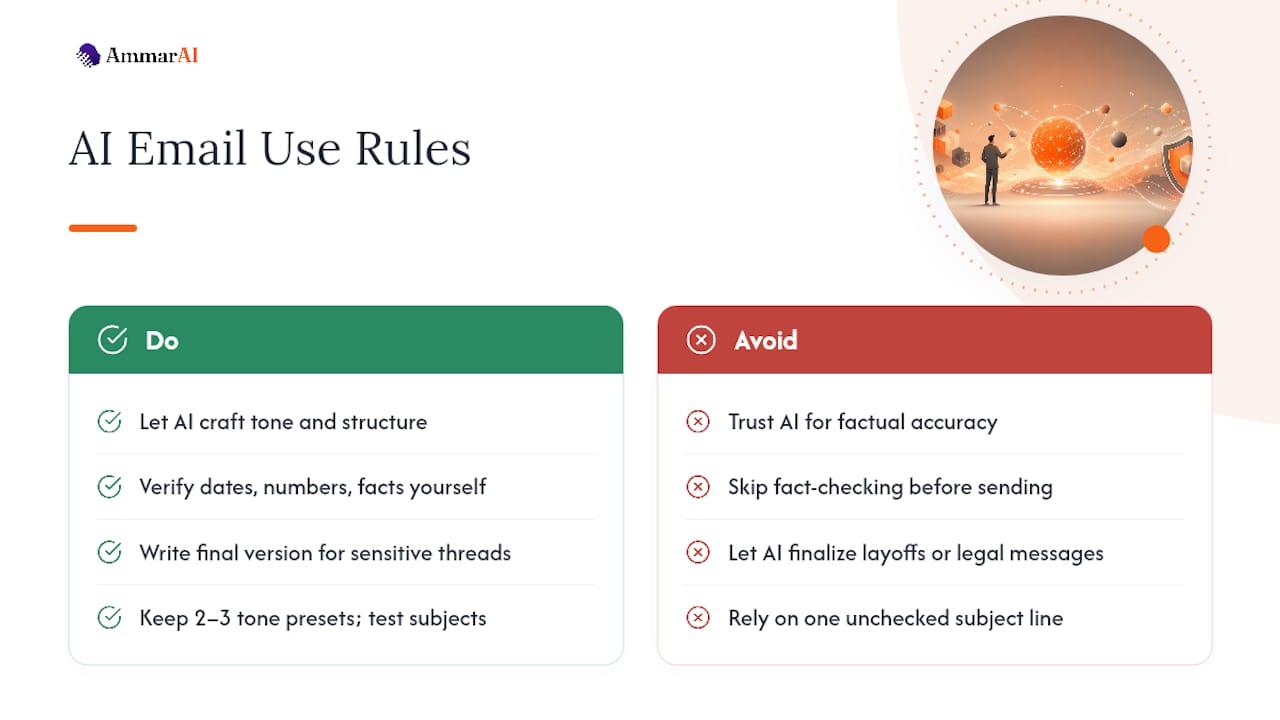
The mistake I see most often isn’t laziness. It’s trust placed in the wrong spot. People proofread the tone of an AI draft carefully and skip verifying the actual facts inside it, like a meeting date or a dollar figure. Flip that. Let the tool handle tone and structure, and put your own attention on accuracy.
I’d also draw a hard line around sensitive threads: layoffs, pricing disputes, anything legal. Draft with AI if it helps, but write the final version yourself. Keep two or three tone presets on hand and test subject lines in small batches. That’s the whole system, and it’s boringly effective.
— Ahmed
Try AmmarAI’s Email Tools Today
Juggling separate subscriptions for email drafting, social captions, and ad copy creates a fragmentation problem that some AI workspaces aim to solve. One workspace handles the email, the subject line, and the brand voice that keeps all of it sounding like you, without stitching together three logins.

Start with the free tier. Run one real outreach email through the AI Email Generator, then test the subject-line tool on the same message to see three or four variations. If you send similar emails in batches, try a bulk-generation pass next, since that’s where the time savings compound fastest. From there, check whether team workspaces fit if you’re drafting alongside colleagues who need the same tone locked in.
Sources
Recommended
Recommended for you
- Job Descriptions With AI: A Practical Guide for Hiring Teams
Learn how to use AI to write job descriptions: what to feed it, how to prompt it, how to check for bias and invented requirements, and when rules apply.
- Style Transfer Writing: What It Is and How to Use It
Style transfer in writing changes tone and voice while keeping the meaning. Learn how it works, where it helps, and a step-by-step method you can use today.
- How to Keep Brand Voice AI Outputs Consistent
Build a reliable brand voice AI system from approved samples, vocabulary, banned phrases and spelling rules, then test drafts and correct voice drift.
Tools to try next
- AI ReWriter
Rewrite existing text in a different tone, length or reading level while keeping the meaning intact.
- Brand Voice
Define how your brand sounds once, and have every writing tool follow it.
- AI Editor
A long-form document editor with AI help built into the page, for drafting and revising in one place.