
AI Social Media17 min read
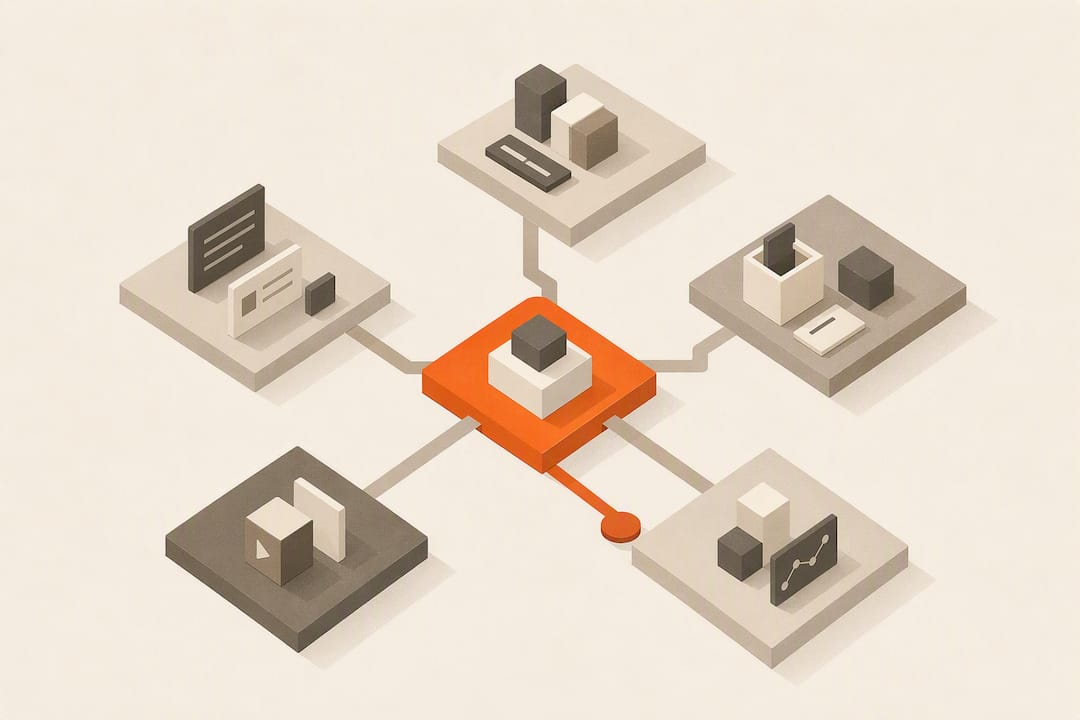
Small Business: Match Needs to 5 Social Media Automation Categories
Match your small business to the right social media automation category. A step by step workflow, two week trial plan, and AI native tips.
Small Business: Match Needs to 5 Social Media Automation Categories
For most individuals and small businesses, the smartest way to automate social media is through an integrated AI-native workspace that handles content generation, per-platform tailoring, scheduling, and engagement in one place, not a bare-bones scheduler. It saves time, keeps your voice consistent across accounts, and covers both posting and audience response. Start by auditing which platforms you actually use, then trial one integrated tool for two weeks before committing.
TL;DR:
- True auto-publish is platform-dependent, with Instagram’s API supporting genuine scheduling, while some tools only send reminders for manual posting.
- Automated engagement features like first-comment links or comment routing are limited and require careful testing for depth of automation.
- An AI-native workspace ensures consistent brand voice across platforms and reduces voice drift compared to stitching together separate tools.
- When choosing tools, verify actual auto-publish capabilities per platform, per-caption tailoring, and the robustness of engagement automation during trials.
- Secure connection permissions, clear revocation methods, and role-based access are essential for maintaining data security when automating social media.
Table of Contents
- What Can You Actually Automate on Social Media?
- Why AI-Native Workspaces Usually Beat a Basic Scheduler
- How Do You Choose the Right Automation Tool?
- Which Category of Tool Actually Fits Your Situation?
- A Step-by-Step Workflow You Can Copy This Week
- What Goes Wrong When You Automate Too Aggressively?
- How Should You Handle Data Privacy and Security?
- How Do You Measure the ROI of Social Media Automation?
- How Does Automation Fit With Your CRM and Email Tools?
- Pragmatic Automation at Small Scale
- How AmmarAI Fits Into Your Automation Plan
- Sources
What Can You Actually Automate on Social Media?
Automation handles a large portion of the repetitive social media work, but not all of it equally well, and not on every platform the same way. Understanding the boundary matters more than picking a tool, because the wrong assumption here wastes a month of setup time.
True auto-publish means a post goes live on a schedule with zero human action at the moment of publishing. That’s different from reminder-based tools that just nudge you to post manually. Instagram is the platform where this distinction bites hardest: SendDM documents true auto-publish for Instagram posts, reels, and stories through Meta’s official API, which is not universal across every scheduler on the market. Some tools still send you a push notification and expect you to tap “post” yourself.
Here’s what reliable automation covers today:
- Scheduling and publishing. Queue content days or weeks out, with true auto-publish on platforms whose APIs support it.
- Per-platform tailoring. Adjusting character counts, aspect ratios, and media formats so one piece of content doesn’t look broken on a second network.
- First-comment and engagement triggers. Automations that fire the moment a post goes live, such as dropping a link in the first comment or routing a comment to a direct message.
- Inbox triage. Sorting incoming comments and messages so a human can respond to the ones that need a real answer.
- Analytics and reporting. Pulling engagement and reach numbers into a dashboard instead of you checking five apps by hand.
- Bulk and API-driven scheduling. Uploading a spreadsheet of posts at once, useful when you’re batching a month of content in one sitting.
What automation still can’t do well: read a comment’s tone and decide whether it needs a human, or notice that a competitor just had a PR crisis and your scheduled joke post is suddenly in bad taste. That judgment call stays with you.
Why AI-Native Workspaces Usually Beat a Basic Scheduler
A scheduler moves content you’ve already written. An AI-native workspace writes it, adapts it, and moves it, and that difference compounds fast when you’re running five platforms with one person’s time.
The core problem with stitching together separate tools, one for writing, one for images, one for scheduling, is voice drift. Your captions start sounding like they came from three different people because, in a sense, they did: a freelance writer, a stock caption generator, and whatever you typed at 11 p.m. before bed. An integrated workspace generates from a single brand profile, so the LinkedIn post and the Instagram caption sound like the same business wrote them, because one system did.
Consolidation also cuts the number of context switches in your day. Instead of drafting in a document, resizing images in another app, and scheduling in a third, you work from one composer with shared templates and brand assets already loaded. That’s fewer tabs, fewer logins, and fewer places for a mistake to slip through.
Multi-model AI processing, meaning the system can call different models for text, image, and video generation without you manually exporting and re-importing, speeds up cross-platform adaptation specifically. A single announcement can become a LinkedIn paragraph, an Instagram caption, and a short vertical video draft without leaving the workspace.

Pro Tip: Build one “master” version of any recurring content type, like a weekly tip or a product highlight, then let the AI adapt it per platform instead of writing five originals from scratch every time.
That said, a simple scheduler is genuinely enough in one scenario: you post to a single platform, your content is straightforward (photos with short captions), and you don’t need engagement automation. Buying a full workspace for that use case is overkill. User reviews of entry-level tools like Buffer on G2 consistently show people are satisfied with basic scheduling when their needs stop there.
Where needs grow past one platform or past simple posting, the calculus flips toward an integrated approach:
- Multiple platforms with different content formats
- A need for consistent brand voice across a team
- Engagement automation like first-comment or auto-reply triggers
- Regular content creation, not just reposting existing assets
How Do You Choose the Right Automation Tool?
Pick based on what the tool actually does under pressure, not its marketing page. Independent roundups like Zapier’s evaluation of social media management tools consistently weigh publish method, platform coverage, and engagement features above brand reputation, and that ordering holds up well in practice.
Run through this sequence during any trial:
- Confirm true auto-publish, platform by platform. Ask directly: does this tool publish to Instagram, TikTok, and LinkedIn without a manual tap, or does it send a reminder? Auto-publish behavior varies significantly by platform because each network’s API has different rules, so treat this as a decisive question, not a formality.
- Test per-platform caption tailoring. Paste one piece of content and see whether the tool intelligently shortens it for a character-limited platform or just dumps the same text everywhere.
- Check engagement automation depth. Can it trigger a first-comment link drop, route a comment to DM, or only schedule posts? This is where basic and advanced tools diverge most.
- Review the content generation quality. If the tool includes AI writing or image generation, test it on your actual brand voice, not a generic demo prompt.
- Look at team workflow support. Can a second person review a draft before it goes live? Is there an approval step, or does everything publish the moment it’s queued?
- Ask about security and data handling. Where are your connected account tokens stored, and can you revoke access cleanly if you cancel?
- Get specific on pricing shape. Is the posting quota per month, per platform, or per account? A “50 posts” limit means something very different if you run six channels versus one.
Watch for these red flags during a trial:
- Hidden quotas that only appear after signup. If the pricing page doesn’t state a clear posting limit, assume there’s a catch.
- No per-platform preview before publishing. You should see exactly how a post will look on each network before it goes live, not after.
- Weak or absent engagement controls. A tool that only schedules and can’t touch comments or DMs isn’t automating engagement, whatever the landing page implies.
- Vague API language. “Integrates with Instagram” can mean anything from a real publish connection to a glorified reminder system. Ask them to show you, not tell you.
Which Category of Tool Actually Fits Your Situation?
Five categories cover almost every automation need, and matching your situation to the right one saves you from paying for capability you won’t use, or worse, choosing something too thin for what you need.
Entry-level schedulers fit best when you post to one or two platforms, don’t need engagement automation, and want something cheap and simple. Buffer-style tools live here, and reviewers on platforms like G2 rate them well specifically for straightforward queuing, not advanced automation.
Specialist platform publishers exist for creators who live on one network and need that network’s quirks handled precisely. If Instagram Reels and Stories auto-publish is your entire requirement, a tool built around that one API connection, like the behavior SendDM documents for Instagram scheduling, often outperforms a generalist tool trying to cover fourteen platforms at once.
Engagement and inbox platforms matter when your bottleneck isn’t posting, it’s responding. A busy comment section or DM inbox across three platforms needs centralized triage more than it needs another scheduling calendar.
AI-native integrated workspaces make sense once you need generation, publishing, and analytics under one login, with a consistent brand voice across everything you produce. This is the category built for small teams juggling multiple platforms without a dedicated social media hire.
API-first and agentic platforms serve a narrower, more technical audience: businesses that want programmatic control, custom approval pipelines, or quality-scoring logic layered on top of AI-generated content. Platforms like SmartSocial, which runs 26-plus specialized AI agents across 14 platforms with brand extraction and quality scoring, sit here, as do agentic schedulers like Posthive that support CSV bulk scheduling with per-row platform exclusions. Most small businesses don’t need this level of programmatic control, but agencies managing many client accounts often do.
A Step-by-Step Workflow You Can Copy This Week
Automation fails most often not because the tool is bad, but because nobody planned the sequence before turning it on. Here’s a workflow that avoids that trap.
- Audit your accounts. Connect every platform you actually use and check each one’s real publish capability. Instagram’s API supports genuine auto-publish for posts, reels, and stories; confirm the same is true, or isn’t, for every other network before you build a schedule around an assumption.
- Plan your content buckets. Decide on three or four recurring categories, like product tips, behind-the-scenes, and customer questions, and set a cadence for each. This is also where you set approval gates: who reviews a post before it schedules?
- Create with AI-assisted drafting. Generate a base version of each piece, then have the system adapt it per platform rather than writing five separate originals.
- Schedule and attach triggers. Set the publish time, then layer on engagement automations, a first-comment link, a comment-to-DM flow for lead capture, so they arm automatically the second the post goes live.
- Engage and measure. Triage your inbox on a fixed schedule (twice daily works for most small teams), and set two or three KPIs you’ll actually check weekly, not twenty you’ll ignore.
Pro Tip: Keep a simple audit log, even a shared spreadsheet, tracking what published, when, and whether a human approved it. When something goes wrong (and eventually something will), you want to know in thirty seconds whether it was a tool error or a process gap.
Build in a manual override from day one: every automated workflow needs a rollback step, a way to pull a scheduled post or pause engagement triggers within minutes if something looks off.
What Goes Wrong When You Automate Too Aggressively?
Over-automation shows up as spammy-sounding replies, comments answered with the wrong tone, or a bot response to a genuine complaint. Each of those costs you more trust than the time saved is worth.
Platform limits compound the risk. “Auto-publish” doesn’t mean the same thing everywhere: some networks’ APIs support full unattended posting, others only support scheduling with a manual publish tap, and independent roundups flag this inconsistency as a top reason tools disappoint new users.
Set these guardrails before you scale up automation:
- Limit auto-replies to clearly defined triggers, like FAQ keywords, and route anything ambiguous to a human.
- Build in retry logic with alerts, so a failed publish because of a rate limit gets flagged, not silently dropped.
- Keep an audit log of every automated action so you can trace what happened if a customer complains about a bot interaction.
- Assign a manual override owner, one person who can pause any automation within minutes.
How Should You Handle Data Privacy and Security?
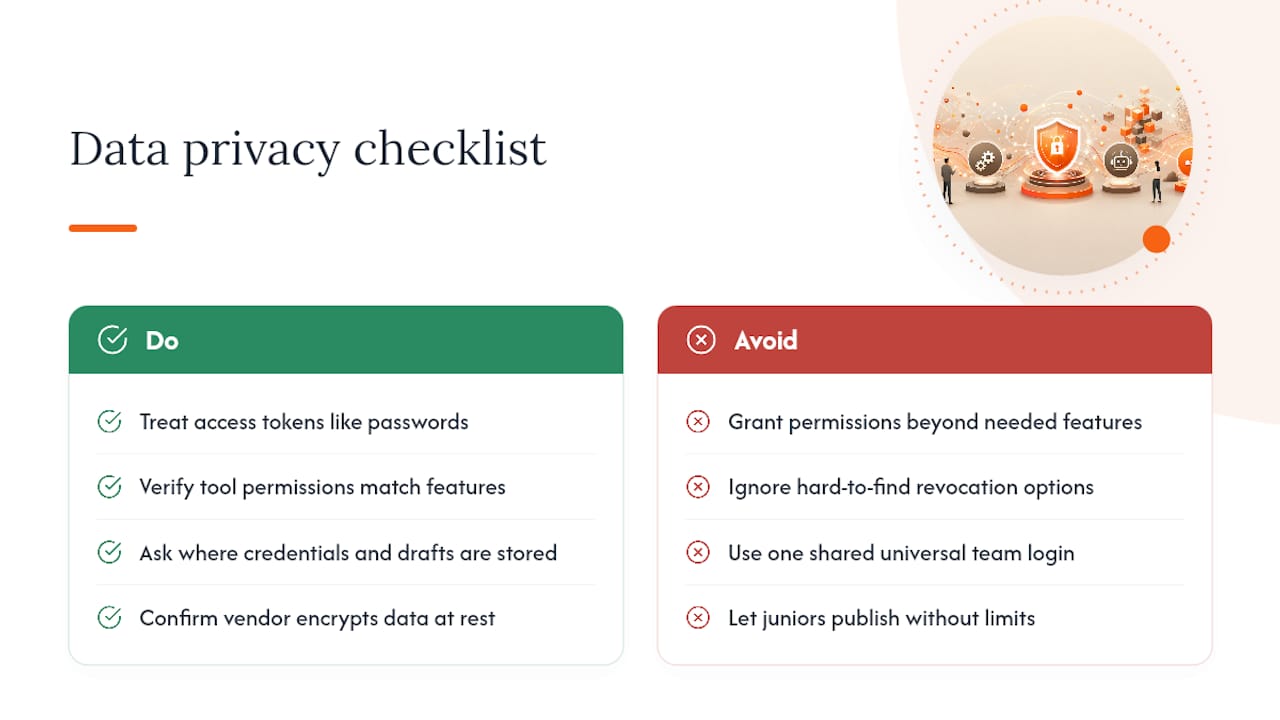
Connecting a third-party tool to your social accounts means handing over access tokens, and those tokens are worth protecting like a password, because functionally that’s what they are.
Before connecting any account, check what permissions the tool actually requests. A scheduler needs posting access; it doesn’t need access to your private messages or ad account unless engagement automation is part of what you’re using. If a tool asks for more than its stated feature set requires, that’s worth a second look.
Ask where credentials and content drafts are stored, and whether the vendor encrypts data at rest. Look for a clear process to revoke access instantly if you cancel a subscription or suspect a breach, most legitimate platforms surface this in account settings, not buried in a support ticket queue. If a tool makes revoking access hard to find, treat that as a warning sign about its overall security posture.
Team-based tools introduce another layer: who on your staff can see draft content, approve posts, or access connected account tokens? Role-based permissions, where a junior team member can draft but not publish, reduce both accidental and malicious risk. If a platform offers only one universal login for the whole team, you’re accepting more exposure than you probably need to.
None of this should stop you from automating. It just means treating platform connections with the same care you’d apply to any tool that touches customer-facing accounts.
How Do You Measure the ROI of Social Media Automation?
The honest answer is that time saved is the easiest ROI to measure, and the one most businesses undercount. If drafting and scheduling a week of content used to take four hours and now takes ninety minutes, that’s the first number to write down, every week, so the trend is visible.
Beyond time, tie automation to the marketing goals you already track: engagement rate, follower growth, click-throughs to your site, or lead capture through comment-to-DM automations. Compare a four-week window before automation to four weeks after, using the same metrics, so you’re not comparing a slow month to a busy one.
Watch for a false positive: posting volume goes up, but engagement per post goes down. That pattern usually means automation increased output without maintaining quality, which is a sign to slow down and refine templates rather than push harder. A smaller number of well-tailored posts often beats a larger number of generic ones.
Set a review cadence, monthly is realistic for a small team, and ask three questions each time: Is the time saved holding steady? Is engagement per post stable or improving? Is any engagement automation (like first-comment link drops) actually converting into clicks or messages? If the answer to any of those turns negative for two review cycles running, that’s your signal to adjust the workflow, not abandon automation altogether.
How Does Automation Fit With Your CRM and Email Tools?
Social media automation works best when it doesn’t sit in isolation from the rest of your marketing stack. A comment-to-DM automation that captures a lead is only useful if that lead actually lands somewhere you’ll follow up.
The most practical integration point is your CRM. When an engagement automation captures contact information through a DM flow, routing that directly into your CRM means a follow-up email or call happens without someone manually copying names from a social inbox. The same logic applies to email marketing: a social post announcing a promotion should feed the same offer into your email sequence, ideally without you rebuilding the copy from scratch in a second tool.
Analytics integration matters too. If your social automation tool reports reach and engagement in one dashboard while your CRM tracks conversions in another, you’re stuck manually reconciling two data sets to understand actual return. Tools that export data cleanly, or connect through something like Zapier, close that gap without requiring custom development work.
The businesses that get the most out of automation treat social media as one input into a connected system, not a standalone channel. A lead captured through an Instagram DM automation should follow the same nurture path as a lead from your website form. If it doesn’t, you’re automating collection but not follow-through, and follow-through is where revenue actually happens.
Pragmatic Automation at Small Scale
Automation only earns its keep when it runs on rules you set on purpose, not a default you never looked at again. Hands-off automation sounds efficient until a bot replies to a complaint with a cheerful canned message, and that single moment can undo months of trust building.
The businesses that get this right treat automation as a lever they adjust weekly, not a system they set once and forget. A retail client I’ve watched operate this way kept a consistent brand voice across four platforms while cutting content operations time by roughly half, simply by defining clear rules for what the AI could handle alone and what needed a human sign-off first.
Start narrow, measure what actually changes, and widen the rules only once you trust the results.
— Ahmed
How AmmarAI Fits Into Your Automation Plan
If you’ve made it through the checklist above, you already know what to look for: real per-platform publishing, consistent brand voice, and engagement tools that don’t sound robotic. That’s precisely where an integrated workspace earns its cost over stitching together three separate apps.

AmmarAI brings that checklist together in one place. Its multi-model AI generates text, images, and video from a single brand profile, so a product announcement adapts into a LinkedIn post, an Instagram caption, and a short video draft without sounding like three different writers touched it. The Social Media Post Generator handles per-platform tailoring directly, adjusting tone and length so a caption written once doesn’t look out of place on a second network. Team workspaces add the approval gates and shared asset library that solo schedulers skip entirely.
Every one of the sixty-plus tools in the workspace, from the AI image generator to the video script generator, pulls from the same brand voice settings, so consistency isn’t something you have to manually enforce post by post.
Start with the free plan to test the workflow against your own content before committing to a paid tier.
Sources
- The 10 best social media management tools in 2026
- Instagram Scheduler — Schedule Posts, Reels & Stories | SendDM
- SmartSocial - AI Social Media Manager for 14 Platforms
- Buffer reviews on G2
Recommended
Recommended for you
- AI Social Inbox Automation: What to Automate and What Not To
How AI social inbox automation works, which DMs and comments to hand to AI, how to set it up and test it, and when a person should take over.
- How to Schedule Posts With a Social Media Scheduling Tool
Use a social media scheduling tool to adapt posts for Facebook, Instagram, X and LinkedIn, preview crops, schedule content and review weekly results.
- AMA Post Generator: Launch Better Q&A Sessions
Use AmmarAI's AMA post generator to draft clear announcements, starter questions, and prompts for engaging Ask Me Anything sessions.
Tools to try next
- AI Social Media Publisher
Preview, schedule and publish posts to Facebook, Instagram, X and LinkedIn from one calendar.
- Brand Voice
Define how your brand sounds once, and have every writing tool follow it.
- AI Agent Builder
Build agents that run real workflows on a schedule or trigger — reading, deciding and acting without you.