
AI Writing14 min read
Knowledge Base AI: How Marketers Build 95% Publish Ready Content
A pipeline-first playbook for marketers and small teams: use agent-driven steps and human review gates with Knowledge Base AI to cut time-to-publish and...

Knowledge Base AI: How Marketers Build 95% Publish Ready Content
Knowledge base AI, in the way marketers and content teams actually use the term today, is an integrated AI workspace and asset library that produces writing, images, video, and audio while holding a single brand voice across every format. The payoff is fewer dropped threads between tools, faster multi-format output, and a documented source of creative truth for teams that publish often. It fits marketers, small business owners, content creators, and agencies who need volume without losing consistency.
TL;DR:
- A project-based workspace with persistent context and AI-tagged assets ensures consistency and speeds up content repurposing across formats.
- Building a reliable workflow requires specialized agents, human review gates, and starting manual testing to identify necessary human interventions.
- Effective inputs include detailed brand guides, past content examples, a content sitemap, and up-to-date taxonomy, revisited quarterly for accuracy.
- Quality control depends on clear criteria, role separation, and permission restrictions, with regular audits to prevent brand drift and errors.
- Integration with existing systems like CMS, project management, and collaboration tools is crucial for daily use and scalable content operations.
Table of Contents
- What Features Does a Branded AI Content Workspace Need?
- How Do You Build a Repeatable AI Content Workflow?
- What Inputs and Templates Make the Pipeline Reliable?
- How Do You Control Quality and Prevent Brand Drift?
- What Results Should You Expect From an AI Content Pilot?
- What Are the Real Limits of an AI Content Workspace?
- How Should Teams Handle Security and Privacy?
- How Does Knowledge Base AI Fit Into Your Existing Stack?
- What’s Next for AI-Driven Content Workspaces?
- What Should Teams Realistically Expect in the First 90 Days?
- Getting Started With AmmarAI’s Content Workspace
- Sources
What Features Does a Branded AI Content Workspace Need?
A workspace that actually holds a brand together needs more than a chat box and a text generator. It needs structure that survives beyond a single prompt.
The core is a project-based workspace, not a folder of loose files. Context (your brand notes, past drafts, chat history) stays attached to a project so the tenth asset you generate still remembers what the first one established. Pair that with a digital asset library that auto-tags images, videos, and drafts, since AI-powered digital asset libraries cut duplicate files and make old work findable again instead of buried in a drive.
Brand voice enforcement has to run through every tool, not just the writing one, or you get a blog post that sounds like your brand next to a product description that doesn’t. Specialized tools matter too: an article generator for long-form drafts, AI Vision for reading and describing images, text-to-speech for narration, transcription for turning meetings into usable copy, and avatar or video generation for short-form content.
What ties it together:
- Persistent, project-level context instead of one-off, disconnected prompts
- AI-tagged asset library with version history and search
- Brand voice rules applied across writing, image, and video tools
- Purpose-built generators (article, image, video, voice) instead of one generic model doing everything
- Research and automation assistants that pull context before drafting starts
Desertdays’ analysis of AI workspaces found that organizing around projects rather than files speeds up repurposing because the source material and generated assets never get separated.
How Do You Build a Repeatable AI Content Workflow?
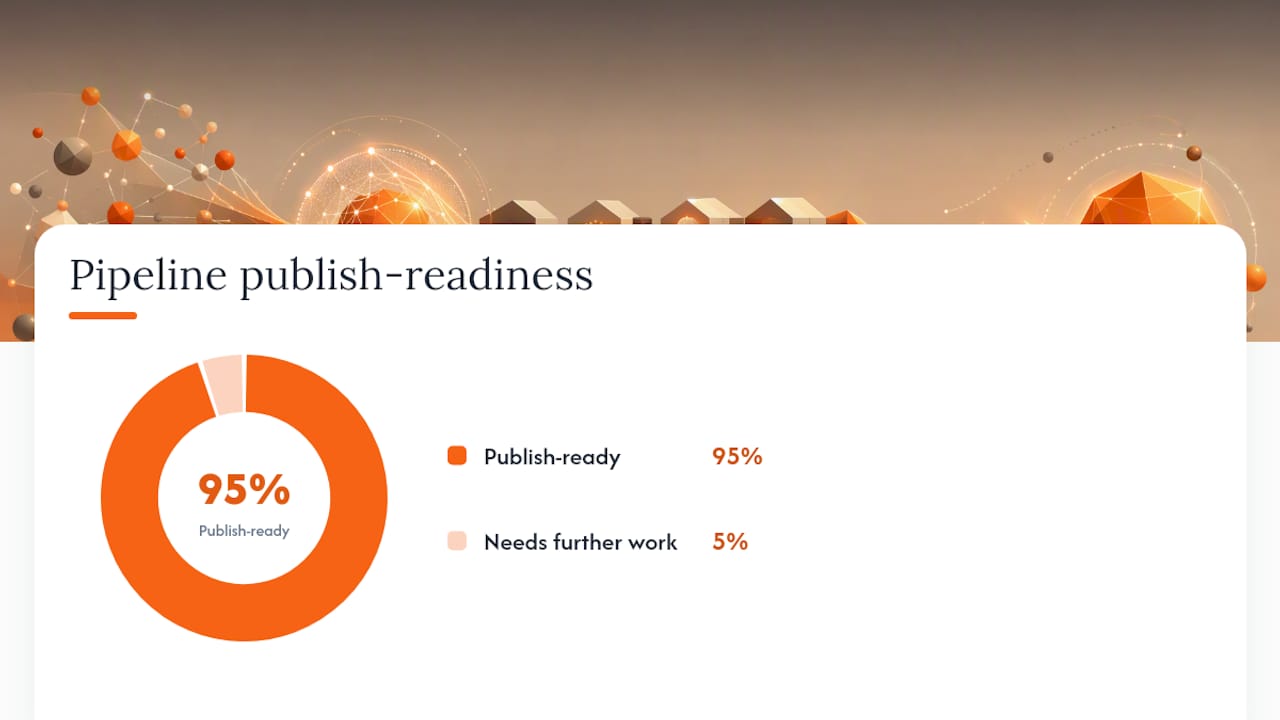
A pipeline that works reliably has clear handoffs, not one prompt doing everything. Search Engine Land’s breakdown of production pipelines found that combining specialized agents with hard-coded context and human review gates gets drafts to roughly 95% publish-ready before an editor even opens the file.
Here’s the sequence that gets you there:
- Research agent pulls SERP context, checks your existing content inventory for overlap, and gathers citable sources.
- Outliner agent turns that research into a structured outline with headings and key points.
- Writer agent drafts the full piece against the outline and your brand voice guide.
- Human editor checks structure, clarity, and whether it actually sounds like your brand.
- Fact-checker verifies claims, numbers, and any cited sources before anything ships.
- AI editor pass strips out stiff phrasing and robotic patterns, tightening the voice one more time.
- Repurposing step turns the finished piece into social posts, a script, or an audio version.
Each agent should only see the inputs it needs. A writer agent buried in twenty pages of SEO data drafts worse, not better. Start narrow, then widen the agent’s inputs only when you can point to a specific gap it’s missing.
Pro Tip: Run your first ten pieces through the full chain manually, agent by agent, before you automate the handoffs. You’ll catch which step actually needs a human eye and which one doesn’t.
Skipping the fact-checker step is the single most common failure point teams report once they scale past a handful of pieces a week.
What Inputs and Templates Make the Pipeline Reliable?
An AI workspace only outputs what it’s given. Thin inputs produce generic drafts no matter how good the underlying model is.
Start with a brand explainer and a real ICP description, and note that B2B and B2C need different details here. A B2B ICP centers on role, company size, and buying committee; a B2C ICP centers on lifestyle, price sensitivity, and where that person actually spends time online. Layer on an expanded brand voice guide with explicit “do this, not that” examples, since enforcing voice through documented signals rather than vague instructions is what keeps tone consistent across dozens of outputs.
Beyond that, feed the system:
- Example briefs and outlines from your best-performing past content
- A sitemap or Screaming Frog export, so drafts don’t duplicate existing pages and can suggest internal links
- A library of internal research, case studies, and pre-approved sources to cite
- Taxonomy and tags for your asset library, since metadata and taxonomy consistently outperform flat folder structures for finding and reusing past work
None of this is a one-time setup. Revisit the voice guide every quarter as your brand’s language actually shifts.
How Do You Control Quality and Prevent Brand Drift?
Quality has to be defined before you can enforce it. Vague “make it good” instructions produce inconsistent output every time. Set concrete criteria upfront: originality against existing pages, voice match against your guide, factual accuracy, and SEO readiness against your target query.
Assign clear roles instead of one person doing everything:
- Editor checks structure, flow, and whether the piece matches the outline’s intent
- Fact-checker verifies every number, claim, and cited source independently
- AI editor runs a final pass to remove stiff, repetitive AI phrasing
- Asset librarian or admin manages version control and who has permission to publish
Permissions matter more than most teams expect. Not everyone on a content team should be able to push a draft live, even a polished one. Set a refresh cadence too: a policy for updating stats-heavy pieces every six to twelve months and retiring pages that no longer serve a query.
Pro Tip: Keep a running log of every AI draft that needed heavy editorial rework. If the same problem shows up three times, the fix belongs in your input documents, not in another editing pass.
What Results Should You Expect From an AI Content Pilot?
The clearest use cases are the ones you’re already doing manually: blog posts, social repurposing, product descriptions, video scripts, narrated audio, and meeting transcriptions turned into usable copy. A single long-form article, run through the right agent chain, can become a script, three social posts, and a narrated summary without starting from scratch each time.
Track a small set of metrics during a pilot rather than trying to measure everything at once:
- Time to publish, from brief to live piece
- Content reuse rate, how many formats one source asset produces
- Cost per piece, including editorial time
- Brand compliance errors caught at the editing stage
- Engagement lift on repurposed versus originally-published content
A workflow that combines agents with defined human review gates routinely gets drafts to roughly 95% publish-ready before a human touches them.
For a 90-day pilot, pick one content type, run it through the full chain for four to six weeks, then compare your baseline time-to-publish against the pipeline’s. Widen to a second content type only once the first is stable.
What Are the Real Limits of an AI Content Workspace?
No AI workspace eliminates the need for human judgment, and treating it that way is where most rollouts go wrong. Models still generate confident, wrong details, especially on numbers, dates, and niche technical claims, which is exactly why a fact-checker gate isn’t optional.
Voice drift is another real problem. A model can sound right for the first fifty outputs and gradually slide off brand as edge cases pile up, which is why voice guides need regular revisiting rather than a one-time setup. Teams also tend to over-automate the approval step too early, letting drafts publish without a human sign-off before the pipeline has proven itself.
There’s a learning curve on the input side too. A workspace is only as consistent as the brand explainer, ICP notes, and example content feeding it. Teams that skip that setup work get generic drafts and blame the tool instead of the missing inputs. And multi-format output doesn’t remove the need for format-specific judgment. A script that reads well doesn’t automatically narrate well, and a blog draft doesn’t automatically compress into a good social caption without a second look.
How Should Teams Handle Security and Privacy?
Content workspaces routinely hold sensitive material: unpublished product details, internal research, customer data referenced in case studies, and draft messaging that hasn’t cleared legal review. That makes access control a real requirement, not a nice-to-have.
Set permissions by role from day one. Not every contributor needs publish rights, and not every asset needs to be visible workspace-wide. Version control matters here too, since a rollback option protects you when a draft gets published before its final review pass.
Ask any AI workspace vendor directly how customer inputs and generated content are stored, whether drafts are used to train shared models, and how long data persists after a project ends. These answers vary by provider, and a team handling regulated information (health claims, financial content, anything under NDA) should confirm the specifics before uploading real client material. Treat your brand voice guide and internal case study library the same way you’d treat any other proprietary document, because that’s functionally what it is.
How Does Knowledge Base AI Fit Into Your Existing Stack?
An AI content workspace that sits completely isolated from everything else your team uses creates more friction than it removes. Integration capability is what determines whether it becomes a daily habit or a tool people forget to open.
The baseline integrations worth checking for: your CMS for direct publishing, a project management tool so briefs and deadlines sync automatically, and collaboration platforms like Slack or Teams for review notifications. Content repository providers note that pre-built integrations across the martech stack are what actually determine whether a content operation scales past a two-person team.
Export flexibility matters just as much as native integrations. A workspace that locks your assets into a proprietary format you can’t pull out cleanly is a liability the moment you switch tools or need to hand assets to an outside partner. Look for straightforward export options for drafts, images, and video files, plus API access if your team has any custom tooling already in place.
What’s Next for AI-Driven Content Workspaces?
Multi-model processing, where a workspace routes a task to whichever model handles it best rather than forcing every job through one general-purpose model, is becoming the norm rather than a premium feature. That shift matters because no single model is best at writing, image generation, and video simultaneously.
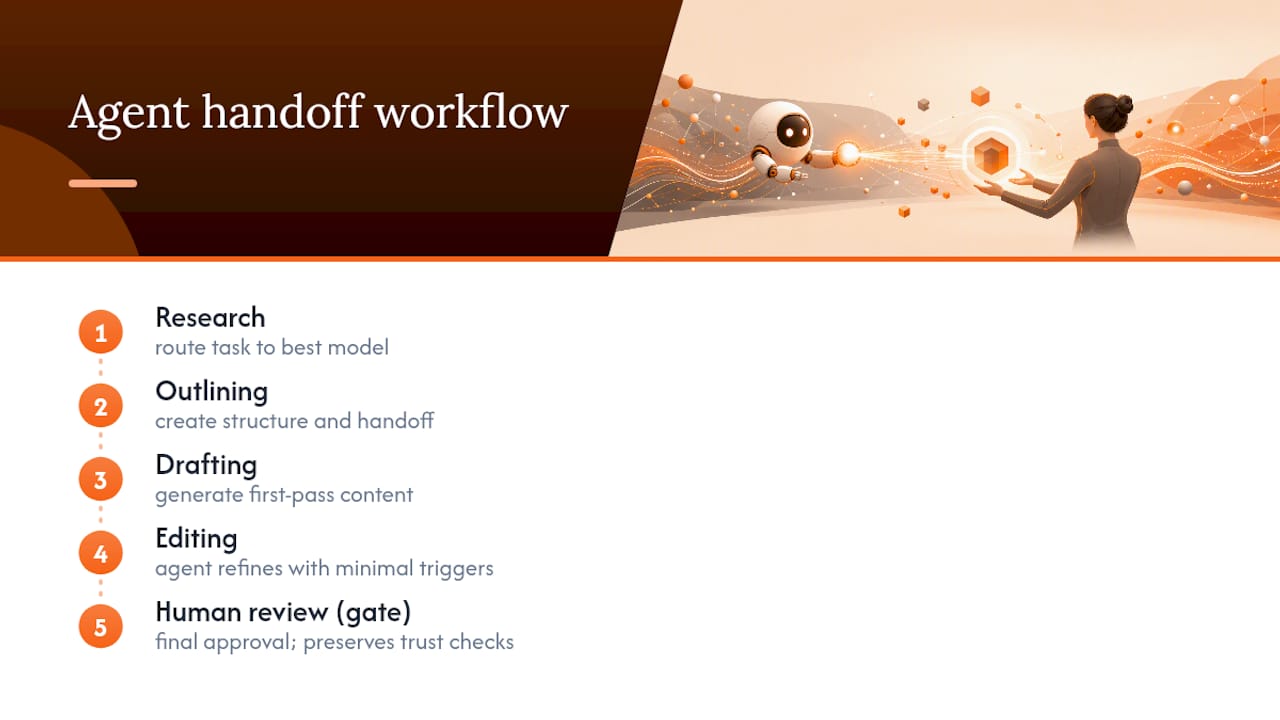
Expect deeper agent orchestration next: research, outlining, drafting, and editing agents that hand off work with less manual triggering between steps. Voice enforcement is also getting more sophisticated, moving from static style guides toward systems that extract brand signals directly from a company’s existing published content and apply them automatically.
Real-time collaboration between human editors and AI agents, where an editor’s inline correction updates the model’s approach mid-session rather than requiring a full regeneration, is likely the next meaningful jump for teams publishing at volume. None of this replaces the review gates that make output trustworthy today. It just makes the earlier stages of the pipeline faster to move through.
What Should Teams Realistically Expect in the First 90 Days?
Start with one content type and a small agent set, not the full pipeline on day one. Trying to automate research, outlining, drafting, editing, and repurposing simultaneously before any single step is proven just multiplies the places something can go wrong. Starting narrow and expanding later with added logic consistently outperforms trying to build the whole system at once.
The most common pitfalls are avoidable: a thin voice guide that gives the model nothing specific to work from, skipping the fact-checker because drafts “look” polished, and automating the publish approval before the pipeline has earned that trust. Watch for early signals instead of waiting for perfect output. A dropping edit-time-per-piece, an editor who stops rewriting the opening paragraph every time, and outputs that repurpose cleanly into a second format without rework are the real markers that the system is working.
— Ahmed
Getting Started With AmmarAI’s Content Workspace
AmmarAI is built around the exact structure this playbook describes: a single workspace holding brand voice rules across all 68 tools, so a product description and a video script pull from the same tone instead of drifting apart. Its multi-model AI setup routes each task, writing, image, video, voice, to whichever model handles it best, instead of forcing every job through one general-purpose engine.

The AI Article Generator handles the drafting stage from your outline, AI Vision reads and describes images for review or repurposing, and the AI Chat Bots support the research and brainstorming steps before a draft ever starts. Practical next steps if you’re testing this against your own workflow:
- Import your brand voice guide and ICP notes before running your first draft
- Run one content type (blog posts are the easiest starting point) through the full pipeline for two to three weeks
- Compare time-to-publish against your current process before expanding to video or audio formats
Start a pilot on AmmarAI’s use cases page to see which tool combination matches the content type you’re producing most often.
Sources
- How to build an AI content workflow from the ground up
- Why you need a content repository (and how to get the most from it) | Contentful
- Digital asset library: How to find on-brand content in seconds
Recommended
Recommended for you
- Job Descriptions With AI: A Practical Guide for Hiring Teams
Learn how to use AI to write job descriptions: what to feed it, how to prompt it, how to check for bias and invented requirements, and when rules apply.
- Style Transfer Writing: What It Is and How to Use It
Style transfer in writing changes tone and voice while keeping the meaning. Learn how it works, where it helps, and a step-by-step method you can use today.
- How to Keep Brand Voice AI Outputs Consistent
Build a reliable brand voice AI system from approved samples, vocabulary, banned phrases and spelling rules, then test drafts and correct voice drift.
Tools to try next
- AI ReWriter
Rewrite existing text in a different tone, length or reading level while keeping the meaning intact.
- Brand Voice
Define how your brand sounds once, and have every writing tool follow it.
- AI Editor
A long-form document editor with AI help built into the page, for drafting and revising in one place.