
AI Marketing18 min read
Marketing Teams: Turn a 7 Day Sprint into a 90 Day AI Marketing Plan
For marketers: run a 7 day sprint that turns one metric into a governed 90 day AI marketing plan with named owners and no new subscriptions.

Marketing Teams: Turn a 7 Day Sprint into a 90 Day AI Marketing Plan
An AI marketing plan is an operating model that ties AI use to one named revenue or retention metric, not a shopping list of subscriptions. The immediate move is simple: pick that metric today, then choose exactly one pilot use case to test against it. Everything else, including which tools you buy, comes after.
TL;DR:
- Focusing on a single revenue or retention metric and testing one pilot use case first yields better results than multiple overlapping subscriptions.
- Prioritize AI applications that generate quick wins in awareness, like creative variants, and allocate longer-term efforts to retention models such as churn prediction.
- Limit concurrent pilots to two or three per funnel stage to prevent conflicting data pulls and ensure proper measurement of each initiative’s impact.
- Integrate AI tools with existing platforms by mapping data flows and ownership to avoid silos and conflicting signals, rather than just adding new tools.
- Keep human ownership for final approvals, strategic decisions, and compliance to prevent brand risks and ensure ethical use of AI models.
Table of Contents
- What Is an AI Marketing Plan, and Why Does Strategy Beat Tools?
- Where Does AI Create the Most Value Across the Funnel?
- How Do You Run a 7-Day AI Marketing Sprint?
- Platform AI, Specialty Tools, or Build: How Should You Decide?
- Who Owns AI Decisions, and Where Does a Human Have to Sign Off?
- How Do You Measure ROI on an AI Marketing Plan?
- What Does a 90-Day AI Marketing Rollout Actually Look Like?
- How Does an Integrated Workspace Support This Plan?
- How Do You Connect AI Tools to the Channels You Already Run?
- How Do You Get a Marketing Team to Actually Adopt AI Tools?
- What Goes Wrong When Teams Implement AI Marketing Plans, and How Do You Fix It?
- What Ethical Questions Should an AI Marketing Plan Address?
- Keep One Rule as You Scale AI in Marketing
- Run Your Sprint Without Juggling Five Subscriptions
- Sources
What Is an AI Marketing Plan, and Why Does Strategy Beat Tools?
Most teams start by buying software. They end up with five overlapping subscriptions, no shared metric, and a Slack channel full of half-finished experiments. Harvard Business Review’s framework argues the opposite order works better: decide first which marketing capabilities AI should augment, then let that decision drive tool selection.
Think of the plan in five layers: positioning, audience research, channel selection, funnel execution, and measurement. AI can touch every layer, but a plan only works when each layer has an owner and a target.
Common failure modes when teams start with tools instead of strategy:
- Buying a generative AI tool before defining which funnel stage it serves
- Running pilots with no shared KPI, so nobody can say if they worked
- Letting three teams automate the same customer touchpoint with different, conflicting logic
- Skipping the audit of what your existing marketing platforms already do with AI
Where Does AI Create the Most Value Across the Funnel?
Not every use case deserves equal attention. Some pay back in weeks; others need a full quarter of data before you see a signal. Group your candidates by funnel stage and treat them as a portfolio, not a wish list.
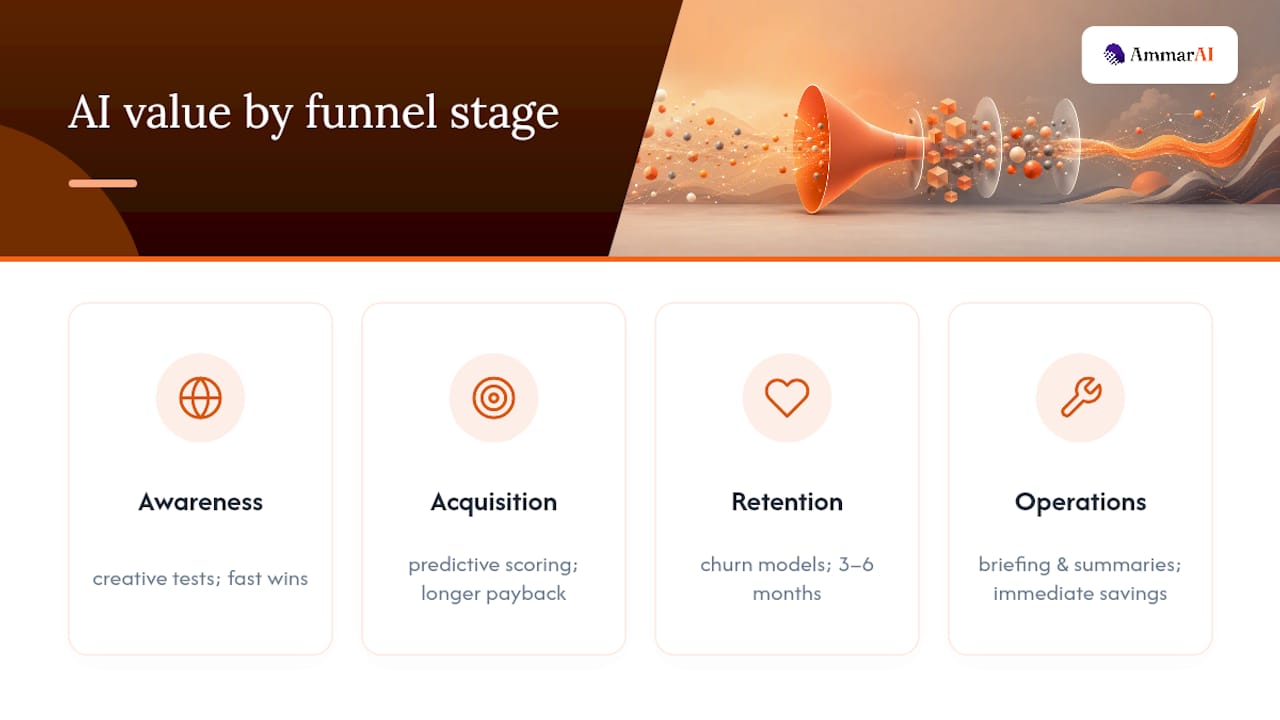
Awareness: AI-generated creative variants and dynamic landing page tests. These tend to be fast wins because you can measure lift within a single campaign cycle.
Acquisition: predictive lead scoring and personalized nurture journeys. Payback usually takes longer since it depends on sales cycle length, but the compounding effect on conversion rate is real.
Retention: churn prediction models and behavioral personalization. This is a medium-term bet, often three to six months before the model has enough signal to trust.
Operations: AI-assisted briefing, call transcription, and campaign summarization. Immediate time savings, low risk, and a good place to build internal confidence before tackling customer-facing use cases.
The BCG and Google study of more than 2,000 marketers found that leaders who integrated AI across a unified customer view, accelerated testing, and dynamic budget shifts reported markedly higher revenue growth than peers running isolated pilots.
Here’s the constraint teams miss: awareness and retention use cases often pull from the same customer data pool and compete for the same analyst’s time. Limiting yourself to two or three concurrent pilots per funnel stage keeps that competition from stalling everything at once.
How Do You Run a 7-Day AI Marketing Sprint?
A documented sprint sequence turns vague intent into a working 90-day plan in a week. Here’s the day-by-day breakdown.
- Day 1: Name the outcome. Write down the single revenue or retention metric you’re optimizing, define your ideal customer profile in one paragraph, and list your money pages (the URLs that actually convert).
- Day 2: Research by intent. Run keyword and SERP research, but sort every term by whether the searcher wants information, comparison, or a transaction. Prompt example: “Group these 50 keywords by search intent and flag which ones a competitor currently ranks for.”
- Day 3: Find the gaps. Cluster topics around your money pages and mark where you have no content addressing a high-intent query.
- Day 4: Draft briefs and variants. Build content briefs formatted for both human writers and AI drafting tools, plus two or three creative variants per ad concept.
- Day 5: Map channels to owners. Decide which channels get budget this quarter and assign a named owner to each, not a team.
- Day 6: Set KPIs and dashboards. Define your measurement blend before launch, not after.
- Day 7: Build the calendar. Produce a 90-day content and campaign calendar with owners attached to every row, plus a quarterly go/no-go checkpoint.
Pro Tip: Feed your AI tool the actual brief, not a vague prompt. “Write a blog post about AI marketing” produces filler. “Write a 900-word post for small business owners comparing platform-native AI to specialty tools, using our brand voice guide” produces something usable.
Each day needs real inputs: your CRM export, past campaign performance, and your brand voice guidelines. Skip the inputs and the sprint just produces confident-sounding guesses.
Platform AI, Specialty Tools, or Build: How Should You Decide?
Audit your existing platforms first. Microsoft’s Copilot documentation shows how much drafting and editing work already happens inside tools you’re paying for. Buying a specialty tool to duplicate that function wastes money and adds a second system of record.
Three categories, three tradeoffs:
- Platform-native AI: already inside your CRM, CMS, or email tool. Lowest integration cost, but limited to what that vendor built.
- Specialty AI tools: built for one job, like image generation or transcription. Strong at that job, but adds a login, a contract, and a data-sharing question.
- Build with APIs: most flexible, most expensive to maintain, and only worth it once you know exactly which workflow needs custom logic.
Before buying anything, run it through a short checklist: Does the vendor have a signed data processing agreement? What’s their SLA for uptime? Does this duplicate a platform feature you already own? And critically, does it create a second source of truth for a metric you’re already tracking elsewhere?
Who Owns AI Decisions, and Where Does a Human Have to Sign Off?
Governance sounds bureaucratic until the first AI-drafted email goes out with the wrong pricing. MaibornWolff’s 2026 guidance recommends a formal RACI map for every AI use case, naming who’s responsible, who’s accountable, who’s consulted, and who’s informed at each stage of the lifecycle.
The line that matters most: keep brand positioning, cross-channel budget allocation, and final campaign approval under human control. Let AI operate with more autonomy only where being slightly wrong costs you little, according to guidance from the Pedowitz Group.
Every use-case brief should include:
- A named accountable owner who signs the go/no-go decision
- A data source statement, so nobody wonders where the training data came from
- A transparency note disclosing AI involvement where it touches customer-facing content
- A compliance check against EU AI Act risk categories, if you operate in or sell into the EU
Pro Tip: Classify each use case by risk level before launch, not after a complaint. A chatbot answering shipping questions and a chatbot influencing a purchase decision carry very different compliance weight, per Aprimo’s governance framework.
How Do You Measure ROI on an AI Marketing Plan?
Attribution has gotten harder, not easier, as AI search and chat interfaces insert themselves between the click and the conversion. Relying on last-click data alone will overstate some channels and erase others entirely.
Two methods hold up better: marketing-mix modeling for channel-level impact over time, and incrementality testing (holdout groups, geo tests) for isolating what a specific campaign actually added. Neither is new, but both matter more now that AI-accelerated search behavior is scrambling the customer journey Google itself used to map cleanly.
Tie every pilot KPI back to the revenue or retention metric you named on Day 1. A lead-scoring pilot that improves model accuracy but never moves qualified pipeline isn’t a win, it’s a distraction.
Report on a 30/60/90 cadence:
- 30 days: Is the pilot generating enough volume to trust the data yet?
- 60 days: Is the metric moving in the right direction, even slightly?
- 90 days: Go or no-go, scale or kill.
Marketers who integrated AI across their customer data, testing, and budget allocation reported meaningfully higher revenue growth than those running AI in isolated, unconnected pilots. That gap comes from the connective tissue between use cases, not any single tool.
What Does a 90-Day AI Marketing Rollout Actually Look Like?
Turn the sprint output into a governed sequence instead of a wish list that quietly dies in week six.
- Weeks 1 to 2: Pilot selection. Choose no more than two or three use cases per funnel stage. Write success criteria before launch, not during the retro.
- Weeks 3 to 6: Build and test. Assign named owners to each milestone. Track weekly, not monthly, so problems surface while they’re still cheap to fix.
- Weeks 7 to 10: Scale what works. Expand budget and scope only for pilots that hit their named metric. Kill or redesign the rest.
- Weeks 11 to 13: Quarterly go/no-go. Bring data to the accountable owner from your RACI map and decide what enters next quarter’s plan.
Plan capacity around roughly 70% of your team’s available hours, not 100%. AI pilots always generate unplanned debugging, retraining, and stakeholder questions that eat the remaining slack.
How Does an Integrated Workspace Support This Plan?
A workspace like Ammarai that combines briefs, multi-format content generation, and brand-voice controls speeds up the sprint’s execution phase, especially Days 4 and 5 where briefs and creative variants get produced.
- Team workspaces keep Day 5’s channel owners working from the same brief instead of five separate documents
- Brand-voice settings reduce the review cycle when non-writers draft first passes
How Do You Connect AI Tools to the Channels You Already Run?
An AI marketing plan doesn’t replace your existing email platform, ad accounts, or CMS. It sits on top of them, and the integration work is where most plans quietly stall.
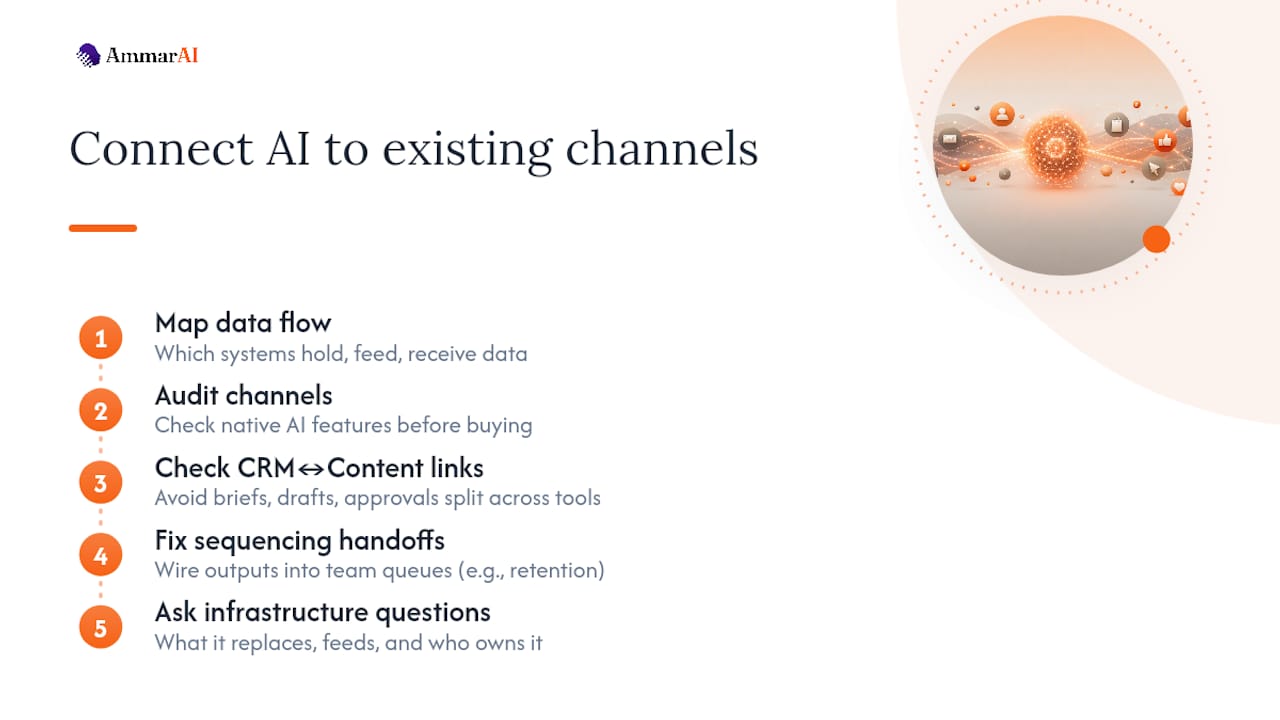
Start with data flow, not feature lists. If your lead-scoring model can’t read from the same CRM your sales team updates daily, the model trains on stale information and the pilot fails silently. Before adding any new AI capability, map which systems currently hold your customer data, which ones need to feed the AI tool, and which ones need to receive its output. A churn-prediction model is worthless if nobody wired its output back into the retention team’s task queue.
Channel-level integration varies by maturity. Email and paid social platforms increasingly ship AI features natively, which is why the audit step matters before you buy anything new. Your CMS might already support AI-assisted metadata generation. Your ad platforms likely already run automated bidding models you didn’t build and don’t fully control, which is worth knowing before you layer a second optimization system on top and create conflicting signals.
The riskier gap is usually the CRM and the content system talking to each other. If your briefs live in one tool, your drafts in another, and your approval workflow in a third, AI-generated content stalls in handoffs regardless of how good the first draft is. Fixing that sequencing problem, not adding another tool, is usually the highest-leverage integration work available.
Treat every new AI capability as a question about existing infrastructure first: what does this replace, what does it feed, and who currently owns that handoff. Skip that question and you get parallel systems doing the same job with different data, which is worse than doing the job manually.
How Do You Get a Marketing Team to Actually Adopt AI Tools?
Most AI marketing failures aren’t technical. They’re adoption failures dressed up as tool problems.
The pattern is predictable: leadership announces a new AI tool, sends a training link, and wonders three months later why usage is near zero. People don’t resist AI because they don’t understand it. They resist it because nobody explained which parts of their job it changes, and nobody removed the old process it was supposed to replace.
Start change management with the people whose job changes most, not the people who approved the budget. A content writer who spends four hours on a first draft needs to understand that AI drafting doesn’t eliminate their role, it shifts it toward editing, fact-checking, and brand judgment. Say that explicitly. Vague reassurance that “AI won’t replace you” without specifics about the new workflow breeds more anxiety, not less.
Build a short feedback loop into the first 30 days of any rollout. Ask the people using the tool weekly what’s breaking, not quarterly. Small friction points, a clunky login, a brief format that doesn’t match how the AI tool expects input, kill adoption faster than any large technical failure because they happen every single day.
Retire the old process the moment the new one works. Teams keep running duplicate manual and AI-assisted workflows for months because nobody formally sunset the old one, which doubles workload instead of reducing it and convinces the team the new tool created more work, not less.
Recognition matters more than most rollout plans account for. The first person on a team to successfully use an AI-assisted workflow to hit a deadline early is your best internal case study. Name them in the retro. That does more for adoption than a company-wide training deck.
What Goes Wrong When Teams Implement AI Marketing Plans, and How Do You Fix It?
The most common pitfall isn’t a bad AI output. It’s launching a pilot with no way to know if it worked. Teams skip the KPI-setting step because it feels slower than just starting, then six weeks later nobody can say whether the churn-prediction model actually reduced churn or just generated a lot of scored leads nobody acted on.
A second pitfall: running too many pilots at once against the same customer data. Awareness, acquisition, and retention teams all want access to the same behavioral data, and when three teams query it simultaneously with different assumptions, the reporting stops matching up. The fix is the concurrency limit already worth repeating here in practice: two or three active AI initiatives per funnel stage, not five.
A third, quieter pitfall: treating AI output as finished work. A drafted email that reads well but cites an outdated price, or a personalization rule that technically works but excludes an entire customer segment due to a data gap, causes real damage precisely because it looked polished enough to skip review. Squarespace’s own guidance on building marketing plans with AI makes the same point: AI accelerates research and drafting, but a human still needs to validate and adapt every output before it reaches a customer.
Budget mismatch is the fourth pattern. Teams approve a pilot budget sized for a single quarter, then discover the model needs six months of data before its predictions are trustworthy. Set expectations at the start about which use cases are fast wins and which are slower bets, and fund accordingly instead of expecting a churn model to prove itself in the same 30 days as an ad creative test.
What Ethical Questions Should an AI Marketing Plan Address?
Compliance checklists cover the legal minimum. Ethical marketing goes further, and it starts with a question most briefs skip: who does this model perform worse for?
Predictive models trained on historical customer data inherit whatever bias exists in that history. A lead-scoring model trained mostly on past high-value customers from one demographic will keep recommending that same demographic, quietly narrowing who your marketing even reaches. Before launching a personalization or scoring model, test its outputs across customer segments, not just its overall accuracy.
Transparency is the second pillar, and it’s broader than a legal disclosure line in fine print. When a customer interacts with an AI-generated recommendation, an AI chatbot, or AI-personalized pricing, they deserve to know that’s what’s happening, even where the law doesn’t yet require it. That standard will only get stricter as AI Act style regulation spreads beyond the EU.
The third question is harder to checklist: does this use case treat customers as people to serve or signals to optimize? Behavioral personalization that anticipates a genuine need feels helpful. The same technique used to exploit a compulsive buying pattern feels predatory. The line isn’t always obvious, which is exactly why it needs a human sign-off point in the workflow, not an automated one. Bias mitigation, transparency, and that basic respect for the person on the other end of the personalization engine aren’t separate from strategy. They’re what keeps a technically successful pilot from becoming a brand liability six months later.
Keep One Rule as You Scale AI in Marketing
Keep human ownership where it actually matters, positioning, budget calls, final approval, and tie every single AI use case to one named revenue or retention metric before you launch it. Everything else in this plan is detail. Run the 7-day sprint, measure honestly, and iterate from there.
— Ahmed
Run Your Sprint Without Juggling Five Subscriptions
Most teams running the 7-day sprint hit the same wall on Days 4 and 5: briefs live in one tool, creative variants get drafted in another, and brand voice drifts between whoever’s typing that day. Ammarai consolidates that work into one workspace, so the brief you write on Day 4 and the ad variants you need on Day 5 come from the same brand-voice settings instead of five disconnected logins.

Team workspaces keep every channel owner from Day 5 working off shared assets instead of forwarding documents by email, which is usually where sprint momentum quietly dies. If your pilot includes paid social creative, the AI ad generator drafts multi-channel copy without starting from a blank page each time, and brand voice controls keep tone consistent whether a founder or a freelancer is typing. Start with a sprint template inside the AmmarAI workspace and see how much of Day 4 you can clear before lunch.
Sources
- The Blueprint for AI-Powered Marketing | BCG
- How to Design an AI Marketing Strategy - Harvard Business Review
- AI in Marketing 2026: Guide to Strategy, Compliance and ROI | MaibornWolff
Recommended
Recommended for you
- AI Brand Compliance: A Practical Guide for US Marketing Teams
AI brand compliance for US teams: voice, legal disclosure, copyright and provenance checks, plus a review workflow you can start this week.
- AI Brainstorming Prompts That Beat Generic Idea Lists
Copy-ready AI brainstorming prompts, a diverge-then-converge method, and the mistakes that make AI ideas bland. Includes templates for content, products and campaigns.
- Best AI Tools for Social Media: 2026 Guide
Compare the best AI tools for social media planning, writing, visuals, and scheduling, with pricing guidance and clear picks for every team size.
Tools to try next
- AI Marketing Bot
Broadcast marketing messages to your WhatsApp and Telegram audiences — written by AI, segmented, scheduled and measured.
- AI Agent Builder
Build agents that run real workflows on a schedule or trigger — reading, deciding and acting without you.
- AI Social Media Agent
An agent that plans, writes, schedules and adjusts a month of social posts across your accounts.