
AI Writing19 min read
AI Prompt Libraries: A 9-Point Checklist for Production Use
Evaluate, adapt, and productionize AI prompt libraries with a 9-point checklist, prompt-chaining tactics, and practical tips for managing prompts in Ammarai.

AI Prompt Libraries: A 9-Point Checklist for Production Use
An AI prompt library is an organized, searchable collection of ready-to-use prompts, each carrying metadata like model tags, example outputs, and version history. The real value is speed and reliability: a well-built prompt saves you the trial-and-error of writing one from scratch and tends to produce more consistent results. Start by picking a library type that matches your workflow, whether that’s a free public catalog or a platform-integrated tool, or adopt a structured prompt schema you can reuse across projects.
TL;DR:
- A well-structured prompt library includes clear components like role, context, task, constraints, and output format to ensure reliability across uses.
- Prompts with explicit metadata, such as model tags, examples, and last-updated dates, are more trustworthy for consistent production use.
- Teams should assess prompt libraries based on example quality, update frequency, searchability, and licensing, rather than sheer size.
- Reusing prompts safely requires rewriting context details, testing with real inputs, and refining constraints to match specific brand or model needs.
- Public collections are ideal for early experimentation, while enterprise teams benefit more from private, version-controlled, and integrated prompt management systems.
Table of Contents
- What Do AI Prompt Libraries Look Like?
- What Makes a Prompt “Production-Ready”?
- How Do You Evaluate a Prompt Library Before Committing?
- How Do You Actually Use a Library Prompt?
- How Should Teams Integrate Prompts Into Workflows?
- How Ammarai Supports Prompt Libraries And Production Workflows
- What Licensing Terms Should You Check Before Reusing a Prompt?
- Where Do Bias and Ethical Blind Spots Show Up in Prompt Libraries?
- How Do You Contribute a Prompt Back to a Library?
- How Do You Adapt a Library Prompt to Your Own Context?
- Author Perspective: Build or Borrow?
- Try Ammarai for Managing Your Own Prompt Library
- Where to Learn More About Prompt Libraries
- Sources
- FAQ
What Do AI Prompt Libraries Look Like?
Not all prompt collections serve the same purpose, and picking the wrong type wastes more time than writing your own prompt from scratch.
Public curated catalogs are free, community-maintained lists, often hosted on GitHub or personal sites. They’re strong for browsing ideas and seeing how other people structure requests, though quality varies wildly from entry to entry since there’s rarely a review process.
Marketplaces sell individual prompts or prompt packs, usually with a preview of the output attached. These fit people who want a specific, tested result (a sales email sequence, a product description template) without building it themselves.
Institutional or university libraries publish vetted templates with clear use instructions, often tied to research or teaching goals. Wharton’s Generative AI Labs maintains one aimed at business use cases, and the instructions tend to be more rigorous than what you’ll find in a random public repo.
Platform-integrated libraries live inside the AI tool itself, pre-tagged by function and often pre-filled with your brand context.
Who benefits from which type depends on scale:
- Solo creators and freelancers usually do fine with a public catalog or marketplace pack for occasional needs.
- Educators lean toward institutional libraries because the prompts already carry pedagogical framing.
- Enterprise teams need platform-integrated or private libraries where prompts stay versioned, permissioned, and consistent across dozens of users.
Most libraries surface prompts through categories (marketing, coding, education), model tags (which AI model the prompt was tuned for), and example outputs you can preview before committing.
What Makes a Prompt “Production-Ready”?
A prompt scraped from a random blog post and a prompt built for repeated business use are not the same object, even if the words look similar on the page. Production-ready prompts follow a structured schema, and the industry has more or less converged on the same handful of parts.
Community-maintained frameworks document common schemas built from several components:
- Role: who the AI is supposed to act as (a senior copywriter, a Python developer, a skeptical editor)
- Context: the background the model needs to avoid guessing
- Task: the specific action you want performed
- Constraints: word counts, tone rules, banned phrases, formatting limits
- Output format: bullet list, table, JSON, plain paragraph
- Examples: one or two sample inputs and outputs (few-shot examples)
- Reasoning: whether the model should show its work or just deliver the answer
- Edge cases: how to handle ambiguous or missing information
- Refinement directives: instructions for a follow-up pass if the first output misses the mark
Pro Tip: If a library entry skips the “edge cases” component, test it with a deliberately messy or incomplete input before trusting it in production. That’s where most prompts fall apart first.
Metadata matters just as much as the prompt text. A model tag tells you which AI system the prompt was tuned for, since a prompt built for one model can behave differently on another. A last-updated date tells you whether the entry has kept pace with model changes. Difficulty level and clearly marked variables or placeholders (usually written in brackets, like [product name]) tell you how much editing to expect before the prompt fits your case. Example outputs let you judge quality before you spend a single token.
Structured components exist for a practical reason: they narrow the model’s guesswork. A prompt with a defined role, explicit constraints, and a sample output leaves less room for the AI to invent details, which is one of the more reliable ways to cut down on hallucinated or off-brand results.
How Do You Evaluate a Prompt Library Before Committing?
Most people judge a prompt library by how big it looks. That’s the wrong metric. A library with 40 well-documented prompts beats one with 4,000 stale, undocumented entries every time.
Run through this checklist before you adopt any library as part of your workflow:
- Example outputs exist for most, ideally all, entries.
- Model tags specify which AI system each prompt was built and tested for.
- Update cadence is visible, either through a changelog or a last-updated field.
- Search and filters let you narrow by category, model, or use case instead of scrolling endlessly.
- Metadata completeness covers role, context, constraints, and variables, not just a title and a block of text.
- License and reuse terms are stated plainly, not buried or absent.
- Export or API access exists if you plan to use prompts programmatically.
- Private or team workspaces are available if more than one person needs to edit or approve prompts.
- Version control tracks changes so a bad edit doesn’t silently replace a prompt that worked.
A compact six-axis rubric covering example quality, metadata completeness, update cadence, searchability, export access, and team features is usually enough to score a library without an exhaustive audit. Score each axis 1 to 5 and compare totals. A public catalog might score high on searchability and example quality but low on team features and export access. A platform-integrated library often flips that: strong on team features, weaker on raw prompt volume.
Watch for red flags that should knock a library out of consideration entirely: no example outputs anywhere, prompts that haven’t been touched in over a year despite major model releases, missing model tags on every entry, or no way to export your work if you decide to switch tools later.
How Do You Actually Use a Library Prompt?
Copying a prompt verbatim rarely produces your best result. The prompt is a starting point, not a finished product.
- Copy the prompt and read through every component before touching anything.
- Replace the variables (the bracketed placeholders) with your actual details: product name, audience, tone.
- Run a small test rather than committing to a full batch. One output tells you more than a guess.
- Inspect the example output against your test result. Where do they diverge, and why?
- Refine the constraints or add examples if the output misses tone, length, or format.
For anything more complex than a single request, prompt chaining is the pattern worth learning. Prompt chaining breaks a large task into smaller modular prompts, where the output of one step becomes the input for the next. A content workflow might run research, then outline, then draft, then edit, as four separate prompts instead of one overloaded request. IBM documents chain-based designs as especially useful in tutoring and customer support, where a consistent, accurate flow across multiple turns matters more than a single clever answer.
The advantage of chaining over one giant prompt is validation at each stage. You can check the outline before it becomes a draft, catching a wrong direction early instead of discovering it after the whole piece is written. Practitioner guidance recommends inserting a human checkpoint after high-risk steps, like data extraction or summarization, before that output feeds into the next generation step.
Pro Tip: Log your test results, including the exact prompt version and the model used, in a simple spreadsheet or note. Six months from now, you’ll want to know why a prompt that used to work suddenly doesn’t.
Other refinement tactics worth knowing: add few-shot examples when the model keeps missing your tone, fix the output format explicitly rather than hoping it guesses right, and lower the randomness setting (often called temperature) when you need consistent, repeatable results rather than creative variation.
How Should Teams Integrate Prompts Into Workflows?
Copy-pasting from a browser tab works fine for one person doing occasional tasks. It falls apart the moment a team needs consistency, version history, or automated testing.
The shift toward professional prompt management usually starts with going local-first. Storing prompts in a structured, machine-readable format like YAML or JSON, rather than scattered text documents, lets you separate the role, context, and task into discrete fields. That structure makes prompts programmatically substitutable and testable across different models, and it plugs directly into version control systems like Git, so a bad edit is one revert away from fixed instead of a permanent mystery.
From there, teams typically move through a few integration categories:
- CLI and prompt-manager tools for organizing and version-controlling prompts outside a chat window, which practitioners increasingly favor as their prompt count grows past a dozen or two.
- API-backed execution for running prompts programmatically instead of manually pasting them into a chat interface each time.
- Code frameworks like LangChain for building multistep chains with conditional logic.
- No-code orchestration tools, such as n8n or Zapier, for teams that want chaining without writing code.
Best practice across all of these: test prompt changes in a staging environment before pushing to production, and restrict who can edit shared prompts so one person’s experiment doesn’t break a workflow five other people depend on.
How Ammarai Supports Prompt Libraries And Production Workflows
Ammarai brings prompt management into a single workspace instead of scattering it across chat tabs and browser bookmarks. Teams can organize prompts by function, keep a shared history, and apply one consistent brand voice across every output. Shared workspaces mean a marketing team and a content team aren’t rebuilding the same prompt twice, and bulk generation lets you run a tested prompt across dozens of variables in one pass instead of one at a time. Readers building out their own prompt structures can test tools like the PAS Framework Generator directly inside the platform to see how a structured prompt performs before scaling it across a campaign.
What Licensing Terms Should You Check Before Reusing a Prompt?
Prompt text sits in a legal gray zone that most people never think to check until it matters. Some public catalogs release prompts under open licenses like MIT or Creative Commons, which generally permit reuse, modification, and even commercial application with minimal restriction. Others carry no license statement at all, which legally defaults to full copyright protection in most jurisdictions, meaning technically you don’t have permission to redistribute or resell that exact wording even if it’s sitting in a public repository.
Marketplaces complicate this further. Buying a prompt pack usually grants you a license to use the output it generates, not necessarily the right to resell the prompt text itself to someone else. Read the specific terms attached to a purchase rather than assuming standard consumer product rules apply, since prompt marketplaces are new enough that terms vary widely from one seller to the next.
Institutional libraries, like university-published collections, often state their intended use plainly: educational or research use, sometimes with a request for attribution if you publish work built on their templates.
The safest working rule: check for an explicit license before reusing a prompt commercially, credit the source when a license requests it, and treat any prompt without a stated license as “look but don’t republish verbatim.” Adapting a prompt’s structure and ideas into your own wording is generally safer ground than copying it word for word into a paid product.
Where Do Bias and Ethical Blind Spots Show Up in Prompt Libraries?
Prompts are written by people, and people bring assumptions into the phrasing whether they mean to or not. A “professional headshot” prompt built and tested primarily by one demographic group can quietly encode narrow beauty or professionalism standards into every image it generates. A “resume writing” prompt built around one country’s corporate norms can produce advice that reads oddly, or worse, unprofessionally, in a different market’s hiring culture.
The fix isn’t avoiding prompt libraries. It’s reading prompts critically before deploying them at scale. A few checks worth running: does the prompt assume a specific gender, age range, or cultural context where none was stated? Does the example output reflect only one type of person, business, or outcome? Does the “role” component assume expertise or authority in a way that could produce overconfident answers on a sensitive topic like health or legal advice?
Community-contributed libraries carry an added risk: popularity doesn’t equal accuracy. A prompt with thousands of stars on a public repository got there because people found it useful, not because someone audited it for bias or factual reliability. Treat community ratings as a signal of usefulness, not a certification of fairness.
The practical habit is simple: run any new prompt against a few different scenarios (different names, contexts, or assumptions) before trusting it for repeated use, especially for anything customer-facing or tied to hiring, health, or financial decisions.
How Do You Contribute a Prompt Back to a Library?
Most open prompt libraries welcome contributions, but the good ones enforce a submission standard that keeps quality from sliding.
The typical process starts with reading the repository’s contribution guidelines, usually a file named CONTRIBUTING.md on GitHub-hosted libraries, which spells out formatting expectations before you submit anything. From there, most libraries expect a pull request or submission form containing the full structured prompt (role, context, task, constraints, and so on), at least one example output showing the prompt actually works, and a model tag stating which AI system you tested it against.
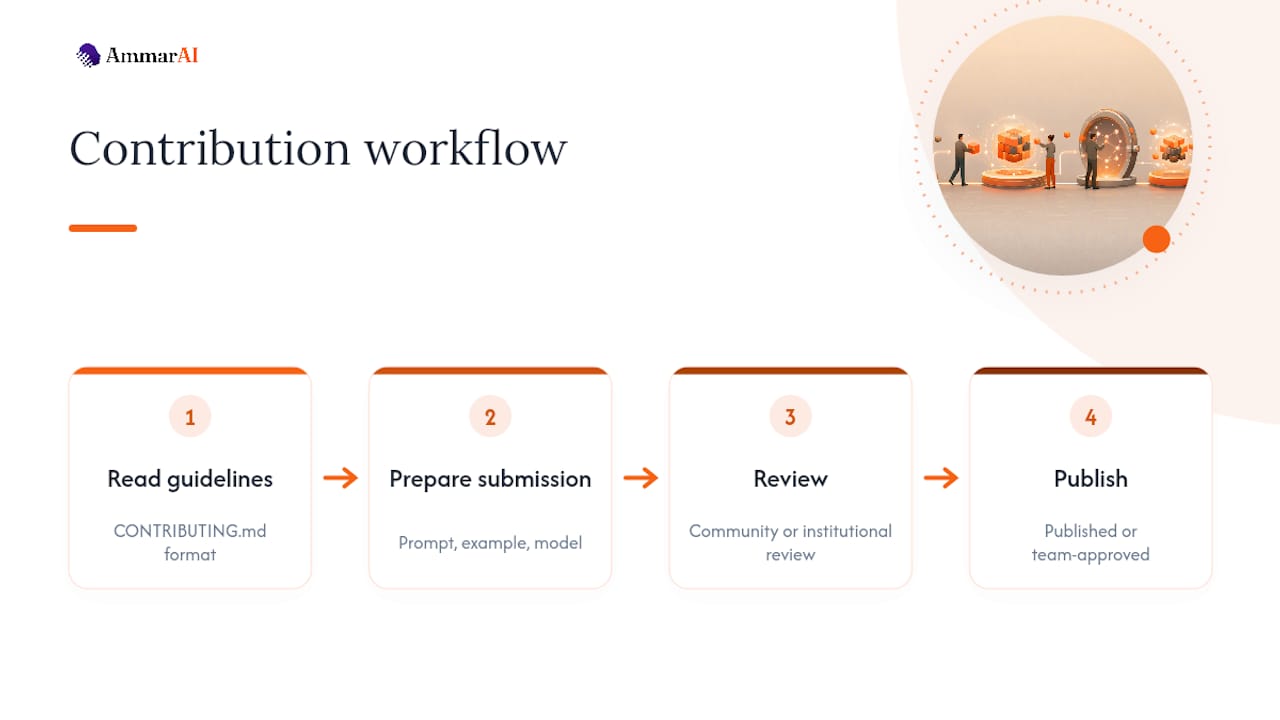
Community standards tend to converge on a few shared expectations. Submissions need to be original or clearly attributed if adapted from another source. Prompts should avoid encoding a narrow assumption about the user’s identity, industry, or region unless that’s the explicit purpose. And most maintainers will reject a submission with no example output, since an untested prompt is a liability for anyone who copies it in good faith.
Institutional libraries often have a stricter bar. A university collection might require a faculty or staff sponsor before adding a new entry, while a platform-integrated library might route submissions through an internal review team before they go live for other users.
If you’re building a private, team-facing library rather than contributing to a public one, borrow the same discipline anyway: require an example output and a model tag before a prompt gets marked as approved for team use. It costs a few extra minutes and saves everyone from inheriting a prompt that only worked once, by accident, for the person who wrote it.
How Do You Adapt a Library Prompt to Your Own Context?
The prompt you pull from a library is a draft, not a finished tool, and treating it as finished is the single most common mistake people make.
Start by rewriting the “context” section with your actual details: your industry, your audience, your brand’s tone. A generic marketing prompt built for a general audience produces generic marketing copy. Feed it your actual customer profile and product details, and the output improves noticeably even before you touch the rest of the prompt.
Next, adjust the prompt for the specific model you’re running it on. A prompt tuned for one AI model may need looser or tighter constraints on a different one, since models vary in how literally they follow formatting instructions and how much they need explicit reasoning steps spelled out. If a library entry carries a model tag, treat any use on a different model as an experiment, not a guarantee.
Add your own few-shot examples where the library’s generic examples don’t match your voice. This single change often does more to align tone than rewriting the instructions themselves, since models tend to pattern-match against examples more reliably than they follow abstract style descriptions.
Finally, build in a constraint the original prompt didn’t have: a banned-phrases list, a specific reading level, a required call to action. These small additions are usually what separates a prompt that works for anyone from one that works specifically for your brand.
Author Perspective: Build or Borrow?
A private, versioned library earns its cost the moment your prompts touch anything sensitive: legal language, brand voice, or customer data, where reproducibility matters more than novelty. Public libraries still win for early experimentation, when you’re testing an idea and speed beats polish. Most teams end up running both, borrowing to prototype and building to scale.
— Ahmed
Try Ammarai for Managing Your Own Prompt Library
If you’ve been juggling prompts across a dozen browser tabs and a messy notes app, Ammarai replaces that whole stack with one workspace where prompt organization, brand voice, and generation happen in the same place. That’s the concrete shift: instead of copying a prompt into ChatGPT, then reformatting the output in a separate design tool, then checking brand consistency by memory, everything runs through one history with one consistent voice applied automatically.

Explore the full feature set to see how shared workspaces and bulk generation work together, or browse 130-plus tools to find where a structured prompt fits your workflow, from copywriting to video. On a free account, test bulk generation against a repeated task, try the PAS Framework Generator against one of your own products, and see whether a shared workspace changes how your team hands off drafts. If automation is the goal, the AI agent builder shows how a prompt chain can run without you triggering each step by hand. Start with Ammarai and see what a single workspace does for a process you’re currently running across five different tools.
Where to Learn More About Prompt Libraries
A few sources are worth bookmarking beyond this guide. Wharton’s Generative AI Labs prompt library offers vetted business templates with clear instructions. GitHub repositories like prompts.chat and thibaultyou/prompt-library show schema-backed, version-controlled examples. For deeper reading on managing AI products at a company level, Polsia’s guide for AI founders covers the broader operational context.
Sources
- shakirdmr/ai-prompt-library
- What is prompt chaining? | Rework Resources
- Prompting Guide — prompt_chaining
FAQ
Is There a Library of AI Prompts?
Yes, and there are several kinds: free public catalogs on platforms like GitHub, paid marketplaces, institutional collections like Wharton’s Generative AI Labs, and libraries built into AI platforms like Ammarai. Which one fits depends on whether you need volume, vetted quality, or team-level organization.
What Is the Most Popular AI Prompt Collection?
There’s no single dominant collection, since popularity depends heavily on use case and which AI model you’re targeting. Open-source repositories with structured, well-documented schemas tend to attract the most contributors and stay more current, since community maintenance keeps them from going stale.
What Are Prompt Libraries?
A prompt library is an organized, searchable collection of pre-written prompts, typically tagged with metadata like the target AI model, example outputs, and last-updated dates. The best ones follow structured frameworks with five to nine components, covering role, context, task, constraints, and output format, so a prompt performs consistently across repeated use.
What Are Some Well-Known AI Prompts?
Widely shared prompt patterns include the “act as an expert” role-based prompt, the few-shot prompt that provides sample input-output pairs before the real request, and chain-of-thought prompts that ask the model to reason step by step before answering. Prompt chaining, breaking a complex task into linked steps where each output feeds the next prompt, has become one of the most recommended patterns for multi-step work like research-to-draft content pipelines.
How Do I Know if a Prompt Library Is Trustworthy?
Check for example outputs, visible model tags, and a recent update date before trusting any entry. A library that documents its metadata clearly and shows real results tends to outperform one with a large volume of untested, undated prompts.
Recommended
Recommended for you
- Job Descriptions With AI: A Practical Guide for Hiring Teams
Learn how to use AI to write job descriptions: what to feed it, how to prompt it, how to check for bias and invented requirements, and when rules apply.
- Style Transfer Writing: What It Is and How to Use It
Style transfer in writing changes tone and voice while keeping the meaning. Learn how it works, where it helps, and a step-by-step method you can use today.
- How to Keep Brand Voice AI Outputs Consistent
Build a reliable brand voice AI system from approved samples, vocabulary, banned phrases and spelling rules, then test drafts and correct voice drift.
Tools to try next
- AI ReWriter
Rewrite existing text in a different tone, length or reading level while keeping the meaning intact.
- Brand Voice
Define how your brand sounds once, and have every writing tool follow it.
- AI Editor
A long-form document editor with AI help built into the page, for drafting and revising in one place.