
AI Voice18 min read
Automate YouTube Shorts in an Afternoon: Blueprint for Engineers
An engineer friendly blueprint to automate YouTube Shorts: every pipeline stage mapped to tools, a checklist, and a one workspace shortcut.

Automate YouTube Shorts in an Afternoon: Blueprint for Engineers
Yes, you can automate YouTube Shorts from idea to published video: Topic → Script → Visuals → TTS → Render → Upload → Learn. Expect several hours of upfront setup for credentials, tools, and templates, then either a few minutes of daily review or a fully hands-off Autopilot run, depending on how much control you want to keep.
TL;DR:
- Automation works best for evergreen or fact-based Shorts, whereas trending or timely content still benefits from manual intervention.
- A reliable pipeline typically involves five stages: topic discovery, script creation, visual generation, narration with captions, and uploading via API or automation tools.
- Setting up and maintaining the pipeline requires initial credential management and a manual dry run, followed by scheduling with tools like GitHub Actions or YouTube API.
- Diversifying topics, hooks, voices, and posting patterns reduces the risk of algorithm detection and copyright issues in automated channels.
- External costs mainly involve API credits and hosting, but ongoing maintenance and quality control are crucial for sustainable automation.
Table of Contents
- What Does It Mean to Automate YouTube Shorts End to End?
- Which Tools Handle Each Stage of the Pipeline?
- How Do You Set Up Automated Shorts for the First Time?
- How Do You Scale Without Sounding Like a Bot?
- Should You Build a Free Stack or Pay for Autopilot?
- How Do You Actually Schedule and Publish Automated Shorts?
- What Are the Legal and Ethical Lines With Automated Content?
- How Do You Avoid Copyright Strikes and Bot Detection?
- How Often Should You Post, and What Format Works Best?
- How Should You Track Performance on an Automated Channel?
- What Goes Wrong Most Often, and How Do You Fix It?
- Where Automation Actually Helps, and Where It Doesn’t
- Build Your Shorts Pipeline Without Stitching Five Tools Together
- Sources
- FAQ
What Does It Mean to Automate YouTube Shorts End to End?
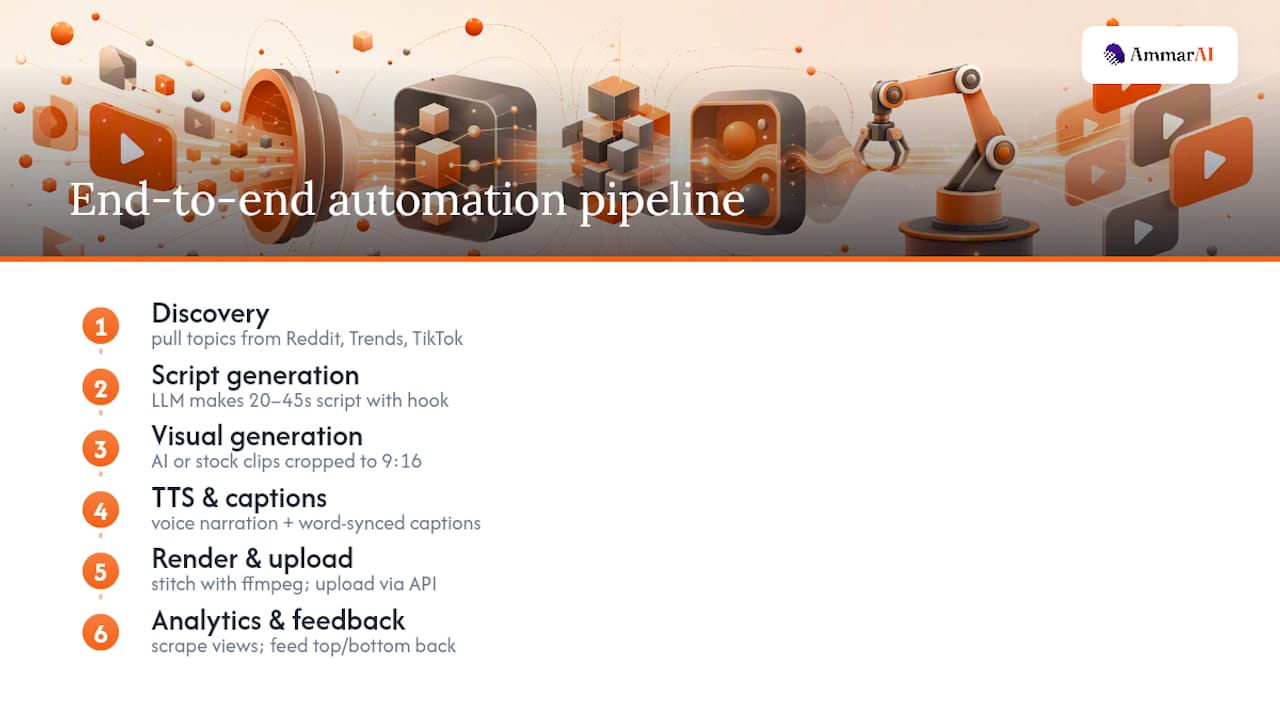
A full automation pipeline breaks the job into distinct stages, each one handing its output to the next. Understanding what happens at each step matters more than memorizing tool names, because tools change but the stages don’t.
Discovery comes first. A topic engine pulls candidate ideas from signals like Reddit threads, Google Trends spikes, or TikTok activity, then ranks them by momentum or relevance to your niche.
Script generation follows. An LLM turns the chosen topic into a tight script with a hook in the first two seconds, a body that delivers the payoff, and a close that either loops or calls for a follow. Keep scripts between 20 and 45 seconds. Longer scripts fight the format; shorter ones rarely have room for a hook and a payoff.
Visual generation comes next, either AI-generated images and clips or stock footage pulled and cropped to a 9:16 frame. TTS and captions happen in parallel: a voice engine narrates the script, and word-synced captions get generated alongside it so text appears in sync with speech.
Rendering stitches everything together with a tool like ffmpeg or MoviePy, handling the vertical safe area, baked-in or SRT subtitles, and audio ducking so narration sits above background music.
Upload happens through the YouTube Data API v3, the recommended route, or through browser automation with something like Selenium if the API path isn’t viable for your setup.
The loop closes with analytics scraping. A well-built autopilot pipeline pulls view counts after publish and feeds the top and bottom performers back into future prompt generation, so the system gets sharper the longer it runs.
Which Tools Handle Each Stage of the Pipeline?
You don’t need one perfect tool. You need one solid choice per stage, and the tradeoffs are usually about speed, cost, and how much control you want to give up.
- Topic discovery: RSS feeds, Reddit scrapers, the Google Trends API, or lightweight TikTok scraping scripts surface what’s trending in your niche right now.
- Script engines: Local models like the LLaMA family running through Ollama keep costs at zero and data private, but cloud LLMs generally write faster and handle nuance better. Cost and latency are the real tradeoff here, not quality alone.
- Visuals: AI image and video generators cover original visuals; Pexels or Pixabay stock libraries cover fast, free B-roll. Either way, set a resolution and style preset for 9:16 up front so you’re not reformatting every clip.
- TTS: Free options like edge-tts work fine for volume; paid cloud voices sound more natural. Rotate two or three voices across your channel so every video doesn’t sound identical.
- Captions: faster-whisper (a faster implementation of OpenAI’s Whisper) generates word-level timestamps directly from audio, or you can derive an SRT file from your TTS engine’s own timing data.
- Render and assembly: ffmpeg or MoviePy handle composition, simple Ken Burns pans on static images, and baked-in captions.
- Upload and scheduling: the YouTube Data API v3 with an OAuth refresh token is the stable choice; Selenium-driven Studio automation is the fallback. Both can run on a schedule through GitHub Actions or a basic cron job.
Pro Tip: Lock your file naming and metadata templates before you scale past a handful of videos. Retrofitting a naming convention across 200 rendered files is a miserable afternoon you can avoid entirely.
How Do You Set Up Automated Shorts for the First Time?
Getting the pipeline running the first time is mostly about credentials and a single successful dry run — using a reliable cloud workspace helps keep your setup portable and consistent across environments. Do it in this order:
- Create a Google Cloud project, enable the YouTube Data API v3, and generate OAuth client credentials for your app.
- Generate a refresh token, or if you’re going the browser-automation route instead, set up a dedicated Firefox profile for Selenium to drive.
- Provision a place to run the pipeline: a GitHub Actions runner, a small VPS, or a serverless function all work. Install ffmpeg, Python, and whatever libraries your script and TTS stages depend on.
- Set up your source keys (Pexels or Pixabay for stock, a paid TTS key if you’re not using a free option) and build a project config file with your channel’s branding and metadata defaults.
- Do a dry run: render one Short locally and check it plays correctly. Then test a single OAuth upload manually before you turn on the scheduler.
Once that first upload lands in your channel, cron or GitHub Actions can take over the recurring runs.
How Do You Scale Without Sounding Like a Bot?
The jump from one working pipeline to a channel that posts reliably is where most people either get it right or burn out. Start at one Short a day. Once you trust the output quality, ramp to one to three a day. Posting ten or more daily invites algorithmic scrutiny and, frankly, produces content nobody asked for.
Avoiding a robotic feed comes down to five diversity systems working together: topic rotation so you’re not covering the same three angles on repeat, hook sampling so every video doesn’t open the same way, voice rotation across your TTS options, a history-exclusion filter that blocks near-duplicate topics, and performance-informed generation that leans into what’s actually working.
That last piece is the feedback loop. Scrape views and watch time after each upload, then bias future prompts toward your top performers and quietly retire formats that flop. A documented autopilot build uses exactly this approach, scraping metrics and routing them back into prompt generation automatically.
- Set a hard daily upload cap in your scheduler config, not just in your head.
- Route policy-sensitive topics (health claims, financial advice, anything political) through a human review step before publish.
- Vary your visual style presets every few weeks so the channel doesn’t look visually static even as topics rotate.
Should You Build a Free Stack or Pay for Autopilot?
A DIY stack can run close to free. Your main costs are hosting (a cheap VPS or the free tier of GitHub Actions), API credits for your LLM and TTS calls, storage for rendered files, and your own time monitoring for failures.
That last part is the catch. Free stacks trade money for maintenance: broken auth tokens, API rate limits, and dependency updates all become your problem to fix at 11pm.
- Free/DIY: lowest cash cost, highest time cost, full control over every stage.
- Paid Autopilot platforms: integrated review queues and Autopilot publishing mean less babysitting, at the cost of a subscription.
- Move to paid when you want one brand voice enforced across every video, bulk generation instead of one-at-a-time runs, or you’re simply tired of patching your own pipeline every time an API changes.
The math usually tips toward paid once you’re running more than one channel or you value your weekends.
How Do You Actually Schedule and Publish Automated Shorts?
You have two real paths, and they solve different problems. YouTube Studio’s native scheduler lets you upload a finished video and set a future publish time manually. It’s reliable, and scheduled Shorts get treated identically to Shorts published live by the algorithm, with no reach penalty for scheduling ahead. You can queue a Short up to two years out if you want that kind of runway.
The catch is that Studio scheduling still requires a human to upload the file. It doesn’t connect to your rendering pipeline on its own.
That’s where API or browser automation takes over. The YouTube Data API v3 with an OAuth refresh token lets your pipeline upload and schedule programmatically, no manual click required. This is the path most fully automated channels use, because it closes the loop between rendering and publishing without a human touching Studio at all.
Browser automation with Selenium is the fallback when the API path isn’t viable for your account or use case, but it’s more fragile. Cookie sessions expire, YouTube’s interface changes without warning, and a script built around clicking specific buttons breaks the moment those buttons move. If you’re choosing between the two, the API route wins on stability nearly every time.
A practical setup often blends both: API-driven scheduling for the bulk of your output, with Studio’s manual scheduler kept as a backup for one-off videos or emergency fixes when the automated path stalls.
What Are the Legal and Ethical Lines With Automated Content?
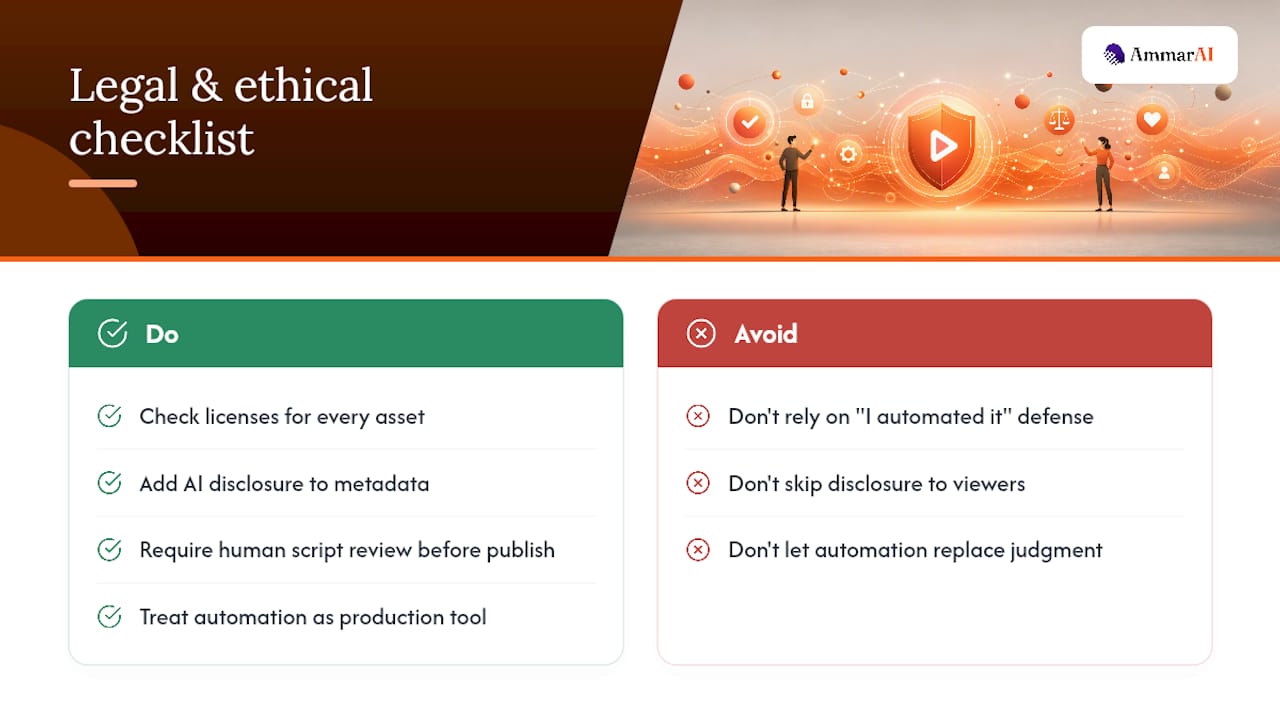
Automating production doesn’t exempt you from copyright law or YouTube’s terms of service. Stock footage, music, and AI-generated images each carry their own licensing terms, and “I automated it” isn’t a defense if a clip you pulled wasn’t actually cleared for commercial use. Check the license on every asset source in your pipeline, not just once when you set it up.
Disclosure is the other piece creators tend to skip. If your voice, visuals, or script are AI-generated, viewers generally have a reasonable expectation of knowing that, and YouTube has been tightening its own labeling requirements for synthetic content. Building a disclosure step into your metadata template now saves you from retrofitting hundreds of videos later.
Then there’s the harder question: does full automation still count as your content? Nobody has a clean legal answer to that yet, but ethically, most creators land on a workable rule: automation handles the repeatable mechanical work, a human still owns editorial judgment. That means someone reviews scripts before they go out, especially for sensitive topics like health, finance, or anything touching current events, where an LLM can confidently generate something wrong. A short human-review step before publish preserves most of the speed benefit of automation while catching the mistakes that damage a channel’s credibility. Treat automation as a production tool, not a replacement for judgment on what your channel says.
How Do You Avoid Copyright Strikes and Bot Detection?
Copyright strikes on automated channels almost always trace back to the asset library, not the automation itself. Stock clips with restrictive licenses, background music that isn’t actually royalty-free, or AI-generated visuals trained on copyrighted material can all trigger a claim. Audit your asset sources for commercial-use licensing before you plug them into a pipeline, and keep a record of where each asset came from in case you need to dispute a claim later.
Automated detection is a separate risk. YouTube’s systems watch for patterns: identical video structures, repetitive audio fingerprints, and posting cadences that look scripted rather than human. The diversity systems covered earlier (topic rotation, hook variation, voice rotation) aren’t just for audience retention. They also make your output look less like a template being run on a loop.
A few concrete habits reduce risk further. Vary your intro and outro structure every few dozen videos instead of using one fixed template forever. Don’t reuse the exact same background music track across every single upload. And avoid uploading dozens of near-identical Shorts in the same session. Space uploads out, even when your pipeline is technically capable of pushing ten at once.
How Often Should You Post, and What Format Works Best?
One Short a day is a reasonable starting cadence for a new automated channel, giving you enough volume to gather performance data without overwhelming your review capacity. Once your pipeline is stable and your diversity systems are working, one to three per day is a common sweet spot for channels trying to grow.
Format matters as much as frequency. Automation works best on evergreen, repeatable formats: fact lists, quick tutorials, “did you know” style content, or niche explainer clips that don’t depend on being timely. These formats tolerate an LLM writing the script because the content doesn’t need real-time cultural awareness to land.
Trend-jacking content and anything tied to breaking news or a viral moment is harder to automate well, because by the time your pipeline discovers, scripts, and renders it, the trend has often moved on. If your niche leans on timeliness, keep a manual fast-path alongside your automated baseline for exactly those moments.
How Should You Track Performance on an Automated Channel?
Monitoring an automated channel needs its own setup, separate from just checking YouTube Studio occasionally. Build a scraping step into your pipeline that pulls views, watch time, average view duration, and click-through rate on thumbnails shortly after each upload and again a few days later, since Shorts performance can shift meaningfully in that window.
Track performance by the variable you’re testing, not just by video. If you’re rotating hooks, tag each upload with which hook template it used so you can see which one actually holds viewers past the first three seconds. Same logic applies to topic categories and voice choices: tag them, then compare.
Set a floor for what counts as underperforming, and route those results back into your prompt generation so the system stops repeating what isn’t working. A weekly review of your worst five and best five videos usually surfaces a pattern faster than staring at aggregate channel analytics.
What Goes Wrong Most Often, and How Do You Fix It?
Auth failures are the most common breakage point. OAuth tokens expire, refresh flows silently fail, and a pipeline that worked fine last week suddenly can’t upload anything. Refresh tokens are more stable than cookie-based sessions, but build in an alert that notifies you the moment an upload fails, rather than discovering it three days later when your channel has gone quiet.
Rendering errors are the second big one, usually caused by a mismatched aspect ratio, a missing font for captions, or audio that’s out of sync with the video track. Test your render step in isolation before you chain it to the rest of the pipeline, so you’re debugging one stage instead of the whole system at once.
Script quality drift is subtler. LLMs left unsupervised for weeks tend to gravitate toward safe, generic phrasing that stops hooking viewers. Periodically spot-check scripts against your best-performing videos and adjust your prompt templates when quality starts sliding. And watch for API rate limits on both your LLM provider and YouTube itself. Nothing stalls a pipeline faster than a quota you didn’t know you’d hit.
Where Automation Actually Helps, and Where It Doesn’t
Automation earns its keep on repeatable, evergreen formats and on high-volume testing where you need dozens of variations to find what resonates. That’s exactly the kind of work an LLM and a rendering pipeline handle well: consistent output, no fatigue, no creative block.
It struggles with anything nuanced, timely, or deeply tied to your brand’s voice in a specific cultural moment. An automated system can’t read the room the way a person scrolling their own feed can. My honest recommendation: run an Autopilot baseline for your evergreen volume, then layer in manual posts for anything trending or time-sensitive. That combination gets you scale without losing the responsiveness that makes a channel feel alive.
— Ahmed
Build Your Shorts Pipeline Without Stitching Five Tools Together
Ammarai replaces the five-tool stack this guide just walked through with one workspace: script generation, an AI video generator, text-to-speech, and a built-in YouTube and Shorts publisher that handles scheduling directly, no separate OAuth setup or cron job required.

The advantage isn’t just convenience. Sharing consistent brand voice settings across tools helps maintain a unified channel style even when content is generated on different days. Bulk generation allows queuing multiple Shorts in one session rather than processing each individually; maintaining a shared history helps track which prompts produced which results. If you want to see how the publisher handles packaging and scheduling recurring Shorts, or if last-mile edits are your bottleneck, the AI Video Editor lets you fix a clip by describing the change instead of reopening a timeline. Start with the Shorts Publisher and cut your setup time down from a weekend to an afternoon.
Sources
FAQ
Recommended
Recommended for you
- AI Collaboration for Teams: How to Make It Work
What AI collaboration for teams really means, what research shows it can and can't do, and a practical rollout plan for shared context, brand voice and review.
- Brand Prompts for AI: Copy-Ready Templates for Your Brand
Copy-ready brand prompts for AI: audience, positioning, voice, story, visuals and daily content, plus how to review the output before it goes live.
- Best AI Voice Generator: 6 Tools Compared
Find the best AI voice generator for narration, cloning, dubbing, and teams. Compare speech quality, language coverage, consent rules, pricing, and fit.
Tools to try next
- AI Voiceover & Voice Clone
Generate natural-sounding voiceovers in 150+ languages and dialects. Clone your own voice or choose from a large library of neural voices, with control over tone, speed, and emotion.
- Realtime Voice Chat
Talk out loud with AI and get spoken replies back, in a live back-and-forth conversation.
- AI Agent Builder
Build agents that run real workflows on a schedule or trigger — reading, deciding and acting without you.