
AI Marketing15 min read
4–6 Week Pilot to Prove AI for Agencies and Map It to Roles
Run a 4–6 week AI pilot pairing agentic automation with brand content and map results to account, creative, and operations to prove value.
4–6 Week Pilot to Prove AI for Agencies and Map It to Roles
The one AI move that pays off fastest is agentic workflow automation paired with brand-grounded content generation. Not a dozen new subscriptions, not a company-wide mandate. Pick one client workflow, run a several-week pilot, and measure it against the client’s own baseline before you touch anything else.
TL;DR:
- Running a successful AI pilot requires focusing on a single, constrained workflow for several weeks and measuring time savings, quality, and client impact against a baseline.
- Agencies should start AI pilots in operations or account management tasks, as these areas have clearer metrics and less subjective judgment than creative work.
- Connecting data systems in a specific order—CRM, analytics, ad platforms, CMS, then file storage—is crucial, along with strict data hygiene and access controls to mitigate risks.
- Effective governance includes documenting AI-created assets, ensuring human review before client delivery, and maintaining an audit trail to prevent errors and build trust.
- A unified workspace that consolidates brand voice settings, history, and tools across functions simplifies pilot management and supports long-term agentic workflow integration.
Table of Contents
- What Is AI for Agencies, Really?
- Where Does AI Actually Save Time by Role?
- What Should You Connect First?
- How Do You Run a Pilot in 4 to 6 Weeks?
- What Governance Rules Should You Put in Place Immediately?
- How a Unified Workspace Turns a Pilot into a Standing Process
- What Agencies Should Expect Over the Next 12 Months
- Start Your Pilot Without Managing Five Subscriptions
- Sources
- FAQ
What Is AI for Agencies, Really?
“AI for agencies” gets used as a catch-all for everything from chatbots to programmatic bidding, which is exactly why so many agencies stall out. The term actually covers three distinct categories of technology, each solving a different problem, and confusing them is why so many pilots go nowhere.
Agentic automation refers to systems that execute multi-step workflows on their own, reading data from one tool, taking an action, then reporting the outcome without a human clicking through each step. Agentic AI platforms built for marketing agencies work best on constrained, repeatable workflows: pulling campaign data, scoring leads, drafting a report, flagging an anomaly. Hand an agent something open-ended and ambiguous, and it tends to drift.
Content generation and asset scaling is the category most agencies already touch. This is copy, image, and video variant generation grounded in a defined brand voice, so a single brief can produce twenty on-brand headline options or a dozen aspect-ratio versions of one video ad without a designer touching each one manually.
Analytics and predictive models cover forecasting, anomaly detection, and pattern recognition across ad spend, engagement, and conversion data. This is the category most agencies underuse, largely because it requires cleaner data pipelines than generation does.
Here’s the practical split agencies keep getting wrong:
- Assisted workspaces (a human prompts, reviews, and publishes) are lower risk and faster to adopt, but they don’t reduce headcount hours the way leadership often expects.
- Autonomous actions (an agent publishes, adjusts bids, or sends a report without review) save real time, but only work once you’ve validated the agent’s decisions across dozens of cycles first.
- Most agencies should run every new agent in assisted mode for at least two to three weeks before flipping it to autonomous.
Forrester’s research on generative AI adoption inside U.S. agencies makes a point worth sitting with: scaling this safely requires new governance and role definitions, not just new software.
Where Does AI Actually Save Time by Role?
Every department in an agency has at least one task that’s tedious, repeatable, and currently done by a human who’d rather be doing something else. Here’s where the time-to-value is fastest, broken out by function.
- Account management. Automated client digests that pull performance data into a plain-language summary save account leads roughly 2 to 4 hours a week per client. Meeting prep (auto-generated talking points from the last 30 days of campaign data) and white-label client reports are the fastest wins here, typically live within one to two weeks of setup.
- Creative. Bulk generation of on-brand copy and image variants lets a creative team test 15 headline directions in the time it used to take to write three. Image-to-video conversion can turn a static product shot into a short video ad without a shoot. Expect meaningful output within the first pilot cycle, usually 2 to 3 weeks, once brand voice settings are dialed in.
- Performance. Always-on optimization agents that monitor spend pacing and flag underperforming ad sets catch problems account managers might not see until the weekly report. Automated campaign triage and anomaly alerts (a sudden CPA spike, a creative fatiguing faster than expected) shave hours off manual dashboard-checking and typically show value within the first week of live data.
- Strategy. Automated competitive scans and audience intelligence reports that used to take a strategist a full day now compile in under an hour. Predictive budgeting models forecasting next-quarter spend based on historical data typically require multiple weeks of validation against real outcomes before becoming fully trusted.
- Operations. Approvals automation, task routing, and content scheduling with built-in compliance checks close the loop between creative and publishing. This is often the single highest-ROI workflow to pilot first because it touches every account, not just one.
Pro Tip: Start your first pilot in Operations or Account Management, not Creative. Creative work is more visible internally, which tempts leadership to judge the whole AI initiative on how good the first batch of ad copy looks. Ops and reporting workflows have clearer baselines and less subjective judgment involved, which makes success or failure much easier to measure.
Marketing AI Institute’s programming for its 2026 agency-focused summit reflects this same pattern: agency priorities have shifted from “which chatbot should we buy” to talent strategy and agent workflow design. This shows where the industry’s collective attention has actually landed.
What Should You Connect First?
Most AI pilots fail not because the model is bad, but because nobody mapped the data plumbing before flipping the switch. Before you connect anything, build a short priority list.
Connect systems in this order: CRM first, analytics second, ad platforms third, CMS fourth, file storage last. This sequence matters because each layer depends on the one before it. An agent can’t score leads intelligently if it can’t see the CRM, and it can’t optimize ad spend if it can’t see conversion data flowing back from analytics.
Before any connection goes live, fix your data hygiene. Specifically:
- Standardize canonical identifiers across systems so a client named “Acme Co.” isn’t three different records in three different tools.
- Enforce consistent UTM tagging across every campaign so analytics and ad platforms actually agree on what drove a conversion.
- Tag creative assets by campaign, format, and date so bulk generation tools can reference brand history instead of starting from a blank prompt every time.
Access control deserves its own line item, not an afterthought. Every agent or integration should run on scoped permissions specific to the client account it touches, never a blanket admin key across your whole stack. Keep audit logs on every automated action an agent takes, and treat client data isolation as non-negotiable when you’re running multiple accounts through a shared workspace. StackAI’s approach to agentic platforms treats every agent action like a code commit: logged, reviewable, and reversible if something goes wrong.
The most common pitfalls are predictable once you’ve seen them once. Overly broad access (an agent that can touch every client’s data instead of just one) turns a small mistake into a large one. Missing baselines mean you can’t prove the pilot worked even if it did. And unmanaged model drift, where an agent’s outputs quietly get worse or weirder over weeks without anyone noticing, is why ongoing spot checks matter more than a one-time QA pass.
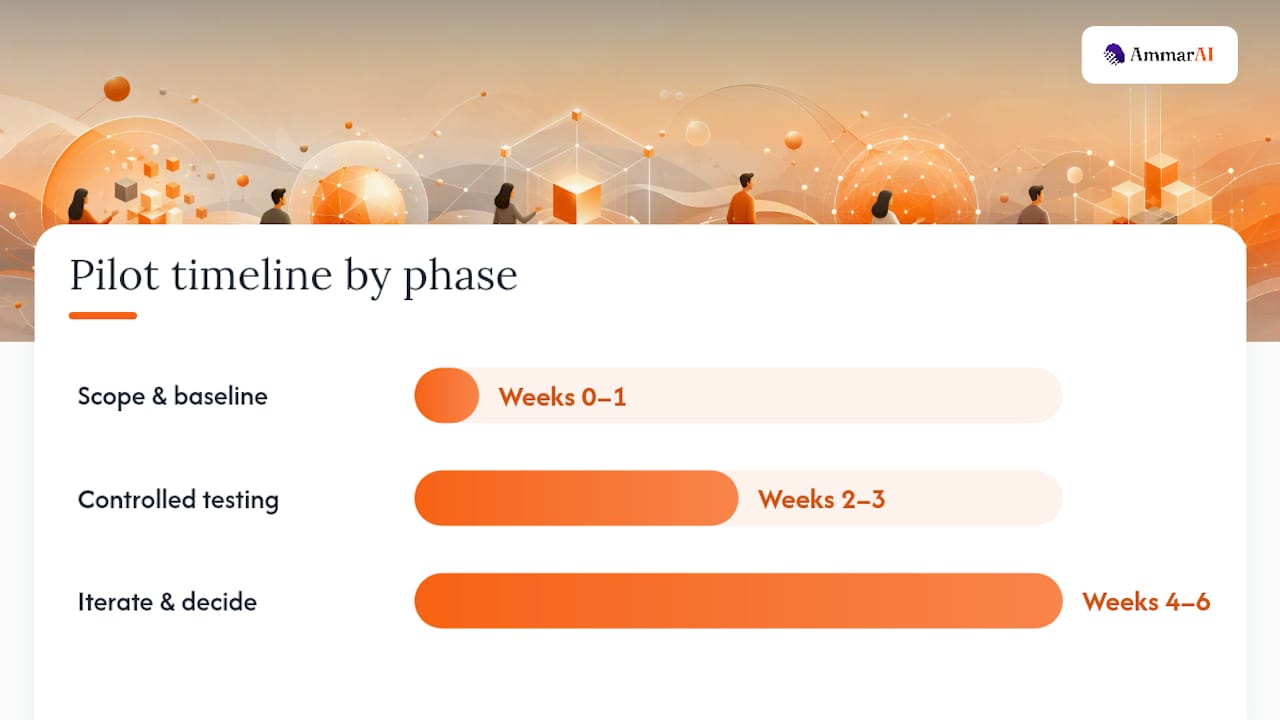
How Do You Run a Pilot in 4 to 6 Weeks?
Pick the pilot using an impact times feasibility matrix: score each candidate workflow on how much time or money it could save, then on how hard it is to access the data and get stakeholder buy-in. The highest-scoring workflow, not the flashiest one, is your pilot.
- Week 0 to 1: Scope and baseline. Document exactly how the current workflow runs, how long it takes, and what quality looks like today. Get read access to the systems you’ll need. Skipping this step is the single most common reason pilots can’t prove their own value later.
- Week 2 to 3: Controlled testing. Run the AI-assisted version alongside the human-driven version, not instead of it yet. Collect output quality, time spent, and any errors side by side.
- Week 4 to 6: Iterate and decide. Adjust prompts, agent permissions, or workflow steps based on what week 2 and 3 revealed. Compare final numbers against your week 0 baseline and make a call.
Four metrics matter more than anything else during a pilot: time saved per task, margin per account (are you actually more profitable on this client, or just busier), conversion or engagement lift on client-facing output, and an error or quality rate tracked against the human-only baseline. Persado’s framing of the work involved in AI content is useful context here: the first draft is roughly 10% of the total effort, and the other 90%, scoring, compliance checking, and optimization, is where the actual performance and profit come from. A pilot that only measures how fast drafts get generated is measuring the easy part.
StackAdapt’s guidance on agencies using AI reinforces measuring both sides of the ledger: internal efficiency and client-facing outcomes, not just headcount hours saved. A pilot that saves your team ten hours a week but tanks client engagement is not a win.
Set your decision gate before the pilot starts, not after. Scale it if time saved and quality both hold or improve past baseline. Iterate if the results are mixed but the core workflow logic seems sound. Stop if error rates climb, client-facing quality drops, or the workflow needed more manual correction than the process it replaced.
What Governance Rules Should You Put in Place Immediately?
Client work carries risk that internal experimentation doesn’t, and skipping governance early is the fastest way to lose a client’s trust once something goes wrong publicly.
Start with disclosure. Most clients don’t need a legal essay, but they do need to know when AI touched their deliverables and where a human reviewed the output before it shipped. A simple line in your statement of work or monthly report, noting which workflows use AI assistance and what your review process looks like, covers most agency relationships.
A few non-negotiables worth putting in writing:
- Keep an audit trail on every AI-generated asset, including which tool created it and who approved the final version.
- Require human sign-off before anything AI-generated reaches a client-facing channel, no exceptions for “low-stakes” content, since low-stakes content is exactly where reviews get skipped.
- Flag marketing claims (health, financial, comparative superiority claims) for extra scrutiny, since generative tools have no idea what’s legally risky to say about a client’s product.
- Document brand voice guidelines as a living reference so every tool and every team member is pulling from the same source, not five slightly different interpretations.
Build a short escalation path for when an AI output is wrong or off-brand: who catches it, who fixes it, and who documents it so the same mistake doesn’t repeat next month.
Pro Tip: Keep a shared “misfire log” for every AI-generated asset that got caught and corrected before it shipped. Six months in, this document becomes the best training material you have, both for tuning your prompts and for showing a skeptical client exactly how your review process works.
How a Unified Workspace Turns a Pilot into a Standing Process
Most agencies that get stuck at the pilot stage share one problem: their AI tools live in four different subscriptions with four different histories, so nothing about brand voice or prior output carries over between projects.
A unified workspace closes that gap. A unified workspace keeps one brand voice setting, one generation history, and one shared workspace across writing, image, video, and agent tools, so a pilot doesn’t fall apart the moment two team members start using slightly different prompt styles.
Mapped to the pilot framework above, a typical rollout inside a unified platform looks like this:
- Week 0 to 1 setup uses bulk generation to produce a baseline batch of on-brand assets against the existing brand voice profile, so you have something concrete to compare against.
- Week 2 to 3 testing runs through an AI Agent Builder, configured to handle one constrained task like scheduling and first-draft reporting.
- Week 4 to 6 measurement tracks throughput (assets or reports produced per week), error rate (how often a human had to substantially rework the output), and client-facing satisfaction on whatever the pilot touched.
An AI Social Media Agent that plans, posts, and adjusts based on performance is a natural first pilot candidate for agencies managing multiple client accounts, since the workflow is repeatable and the baseline is easy to establish.
What Agencies Should Expect Over the Next 12 Months
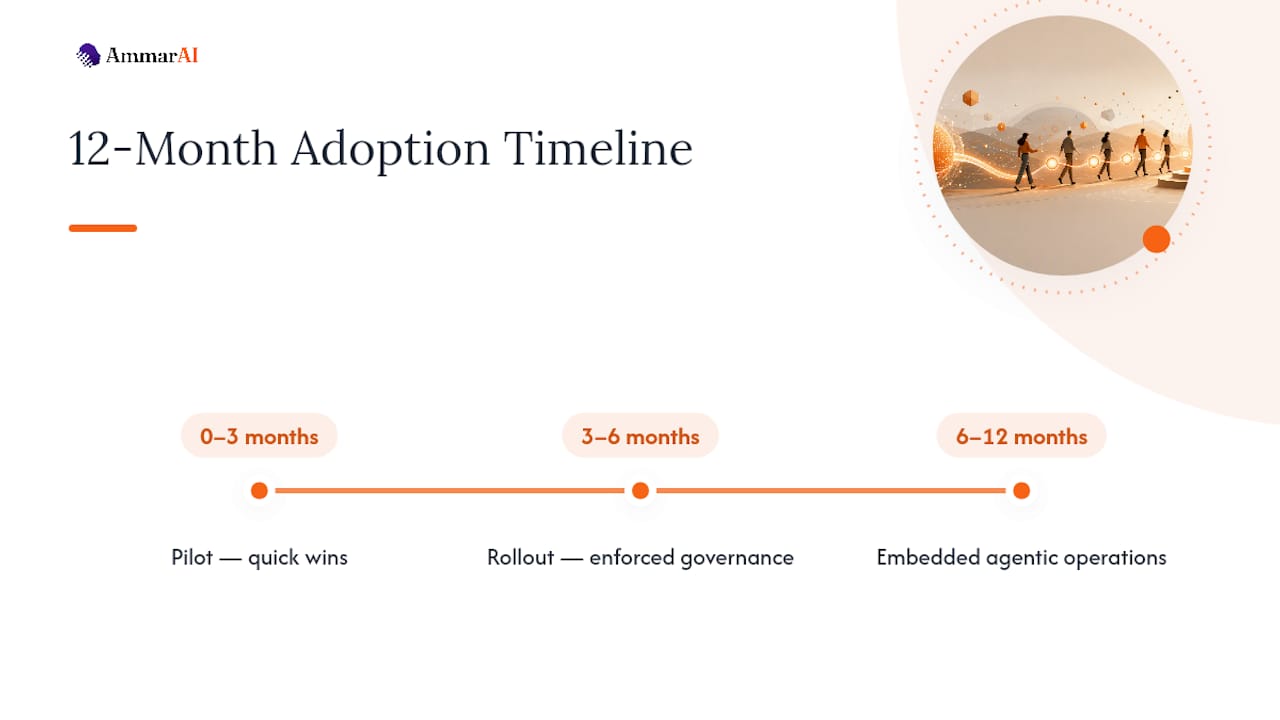
Most agencies overestimate what changes in month one and underestimate what changes by month twelve. Months 0 to 3 are for quick wins: one pilot, one workflow, proof that the numbers hold up. Months 3 to 6 are for wider rollout across accounts, with governance rules actually enforced instead of just written down. Months 6 to 12 are where agentic operations get embedded into daily work rather than treated as a special project.
The skills worth hiring or training for now are prompt engineering, agent operations (someone who monitors and tunes live agents), data engineering for the integration layer, and client change management, because clients need to understand what’s changing in their deliverables and why.
The mistakes I see repeatedly: scope creep that turns a focused pilot into a company-wide mandate before anyone’s proven the concept works, skipping the baseline so nobody can prove the pilot’s value later, and leaning on generative text output while ignoring the performance signals that actually determine whether that content converts.
— Ahmed
Start Your Pilot Without Managing Five Subscriptions
Running a 4 to 6 week pilot is a lot easier when your team isn’t juggling separate logins for copywriting, image generation, video editing, and agent building. A unified platform puts all of it, plus brand voice consistency across every output, inside one workspace with one bill, so the pilot you scope this week doesn’t quietly become five vendor contracts by month three.

Start with the workflow you already flagged as highest-impact. If it’s client reporting or social scheduling, the AI Social Media Agent handles the plan-post-adjust loop without a separate agent-building step. If your pilot is creative-heavy, bulk generation with a locked brand voice profile means your first batch of variants is usable on day one, not after three rounds of tone corrections. Either way, the AI Agent Builder lets you configure the exact constrained task from your pilot plan, whether that’s lead scoring, reporting, or campaign triage, without hiring a developer to wire it together. Set up your workspace and run your first pilot cycle against a real client workflow this month.
Sources
- The state of generative AI inside U.S. agencies (Forrester)
- Persado Intelligence + MCP — Persado
- AI for Agencies Summit 2026 | Marketing AI Institute
- The Agentic AI Platform for Marketing Agencies (StackAI)
FAQ
What Are the Best AI Tools for Agencies?
The best options depend on the workflow, but agencies see the fastest returns from agentic automation for reporting and lead scoring, content generation tools with brand voice controls, and unified platforms like Ammarai that keep those functions in one workspace instead of scattered across subscriptions.
Which Agency Jobs Are Most Likely to Survive AI?
Roles centered on client relationships, creative judgment, and strategic interpretation, account leadership, senior strategists, and creative directors, tend to be more durable, since AI handles execution and drafting far better than it handles trust-building or judgment calls under ambiguity.
When Is the AI for Agencies Summit 2026?
The Marketing AI Institute’s AI for Agencies Summit is a 2026 event focused on agent workflows, tools, and talent strategy for agencies; check the event page directly for exact dates and location.
What Is the Best AI Platform for Agents?
There’s no single best platform for every use case. Agencies building autonomous or assisted agents for reporting, scheduling, and content workflows should look for tools with brand voice controls, auditable action logs, and unified history, which is exactly what a workspace like Ammarai is built around.
How Long Should an Agency’s First AI Pilot Run?
Several weeks is generally enough time to establish a baseline, run controlled testing, and gather sufficient data to make a scale, iterate, or stop decision.
Recommended
Recommended for you
- AI Brand Compliance: A Practical Guide for US Marketing Teams
AI brand compliance for US teams: voice, legal disclosure, copyright and provenance checks, plus a review workflow you can start this week.
- AI Brainstorming Prompts That Beat Generic Idea Lists
Copy-ready AI brainstorming prompts, a diverge-then-converge method, and the mistakes that make AI ideas bland. Includes templates for content, products and campaigns.
- Best AI Tools for Social Media: 2026 Guide
Compare the best AI tools for social media planning, writing, visuals, and scheduling, with pricing guidance and clear picks for every team size.
Tools to try next
- AI Marketing Bot
Broadcast marketing messages to your WhatsApp and Telegram audiences — written by AI, segmented, scheduled and measured.
- Brand Voice
Define how your brand sounds once, and have every writing tool follow it.
- AI Agent Builder
Build agents that run real workflows on a schedule or trigger — reading, deciding and acting without you.