
Create / AI Image
A whole visual set, not one lonely image
Most tools give you one picture at a time and none of them match. The Creative Suite works from a brand brief and produces a coordinated set — the same palette, the same style, every format your campaign needs.
Workflow
From input to outcome with AI Creative Suite
A practical view of what you provide, what AmmarAI handles, and what you leave with.
What you provide
A brand brief and the set of designs you need — ads, social formats, pitch visuals, event graphics.
What AmmarAI does
AmmarAI generates editable layouts with copy and composition on an infinite canvas, with mask-and-instruct editing for precise changes.
What you get
A coordinated campaign set across every format, refined by direction instead of image-by-image edits.
What is the AI Creative Suite?
The hard part of brand visuals is not making one good image, it is making twenty that look related. Colours drift, styles wander, and a feed ends up looking like five different companies.
The Creative Suite starts with a brand brief: palette, mood, audience, the words you would and would not use. That brief is applied to everything it makes, so an ad, a story tile and a packaging mockup share a visual language.
Ask for a campaign and you get the set: hero image, three ad variants, matching social tiles in every ratio, a banner, and mockups showing how it looks in the real world.
Capabilities
What you can do with the AI Creative Suite
How it works
Using the AI Creative Suite
- 01
Write the brand brief once
Palette, mood, audience, industry and what you want to feel like. Add existing assets if you have them.
- 02
Choose the set
Brand kit, campaign pack, social pack, packaging mockups — or list the exact formats you need.
- 03
Review the direction, not each image
Approve the style board first. Fixing direction takes a sentence; fixing twenty finished assets takes a day.
- 04
Generate, refine, export
Swap individual pieces without breaking the set, then export everything at the right sizes.
Examples
What good input and output look like
AI Creative Suite
Live demoWriting the prompt1/2You type
AmmarAI renders
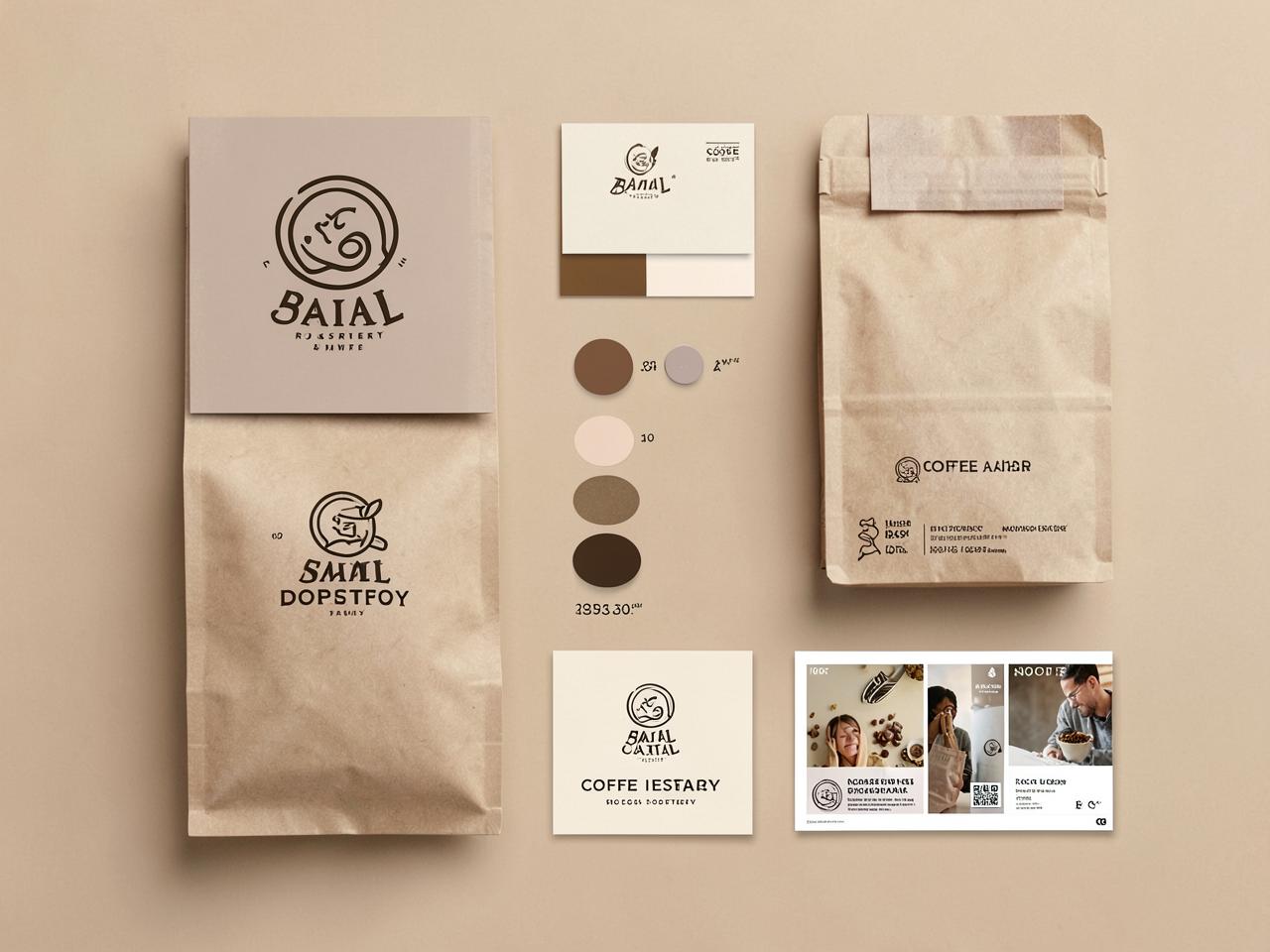
Sample set — a coffee roastery brand kit: mark, palette, card, packaging and social tiles in one style.
A coordinated kit: logo mark, colour swatches, business card, packaging bag, and three matching social tiles — one palette across all of it.
Brand kit for a coffee roastery
Input
Small-batch roastery, warm and earthy, kraft paper and deep brown, sells at markets and online.
Output
A coordinated kit: logo mark, colour swatches, business card, packaging bag, and three matching social tiles — one palette across all of it.
Skincare launch pack
Input
Serum launch, clean and clinical with a pastel edge, three key benefits, running on Meta and email.
Output
Three ad creatives sharing one palette and layout logic, plus square, story and banner crops and an email header — recognisably one campaign.
Key features
What the tool gives you
Brief-driven consistency
Every asset inherits the same palette, mood and composition rules, so the set holds together.
Sets, not singles
Ask once and get every format the campaign needs rather than regenerating one image at a time.
Saved brand styles
Lock a direction and reuse it months later so new work still matches the old.
Infinite canvas and layers
Drag, drop and arrange every element on a canvas that never runs out of room, with full layer, position and appearance control.
Template and asset library
Over twenty pre-made templates plus images, icons, fonts, shapes and symbols to build from instead of starting blank.
Format coverage
Square, story, landscape, banner and print sizes generated together, composed for each ratio.
Feeds the rest of the stack
Push finished visuals into the Social Media Agent, ad copy tools or the image-to-video generator.
Who it is for
People who get the most from this
New brands
Get a coherent visual identity before you can justify a design retainer.
Marketing teams
Ship a full campaign's creative in an afternoon instead of a two-week design queue.
Agencies
Put three complete directions in front of a client instead of three loose images.
Event and community organisers
Posters, tickets, social graphics and signage that obviously belong to the same event.
Workflows
Practical ways teams use it
Launch pack in a day
One brief produces the hero, the ads, the social tiles and the email header, all matching.
Rebrand preview
See a new direction applied across packaging, ads and social before anyone commits budget.
Always-on social
Generate a month of on-brand tiles that look designed rather than assembled.
Tips that improve results
- Spend the time on the brief — every asset inherits its strengths and its vagueness.
- Name three brands whose look you admire and one you want to avoid.
- Approve the style board before generating the full set.
- Save the style once you like it, so next quarter's work still matches.
Mistakes worth avoiding
- Generating assets one at a time and wondering why the feed looks incoherent.
- Putting long copy inside generated images instead of laying text over them.
- Copying a famous brand's identity closely enough to cause trouble.
- Changing the palette halfway through a campaign.
AI Creative Suite FAQ
Can it match my existing brand?
Yes. Give it your palette, logo and a few existing assets and it will work inside that direction rather than inventing a new one.
Is the text inside images reliable?
Short words usually render well, but for headlines and legal copy lay real text over the image so it stays sharp and editable.
Do I own what it makes?
The output is yours to use commercially. For a registered trademark, have a designer refine the final mark.
Can I regenerate one asset without redoing the set?
Yes — each piece can be regenerated on its own and still inherits the saved style.
Tutorial
How to use the AI Creative Suite
Generate images with your chosen AI engine, start from a template or artboard, then refine type, colour and layout in the AmmarAI AI Creative Suite canvas.
Read the tutorialTutorial
How to edit part of an image with annotations
Mark a region on an image in the AmmarAI Creative Suite canvas, attach an instruction, and have the edit applied to that area while the rest stays untouched.
Read the tutorialTutorial
How to generate a design template with AI
Describe a design in AI Creative Suite and get a fully editable template with text layers, images and layout, ready to customise and export.
Read the tutorialRelated
Tools that pair well with this
AI Image Pro
A full image studio: generate from text, edit with a brush, keep one character or style consistent, swap backgrounds, upscale and export every size you need.
AI ImageAI Image Editor
Edit a photo by describing the change — swap the background, remove objects, extend the frame, fix the light.
AI ImageAI Product Photoshoot
Turn one plain product photo into a full commercial shoot — studio, lifestyle and seasonal scenes.
AI TemplatesAd Script Generator
Generate ad scripts for any channel — video, audio, or social — from a single product brief.
AI AgentsAI Social Media Agent
An agent that plans, writes, schedules and adjusts a month of social posts across your accounts.
Related workflows
See how this tool fits into real work
Marketing Teams
AI for Marketing Teams
Turn a single campaign brief into ads, emails, and landing pages without the usual back-and-forth.
Agencies
AI for Agencies
Produce deliverables across multiple client accounts at once, without hiring at the same pace as new business.
Social Media Managers
AI for Social Media Managers
Draft captions, hashtags, and post ideas across platforms so the calendar never runs empty mid-month.
Try the AI Creative Suite free
One AI for everything you create. Start on the free plan and upgrade only when the volume demands it.