
Create / AI Image
One photo in. A whole shoot out.
Photograph the product once against a plain wall. The photoshoot tool places that exact item into studio sweeps, kitchen counters, café tables, sunlit concrete and seasonal sets — same product, professional photography.
Workflow
From input to outcome with AI Product Photoshoot
A practical view of what you provide, what AmmarAI handles, and what you leave with.
What you provide
One good product photo and the direction — studio sweep, lifestyle scene, seasonal set.
What AmmarAI does
AmmarAI places the product into the scene with realistic shadows, reflections and scale, in every ratio you need.
What you get
A matching set of product images for a whole range, with one consistent lighting recipe.
What is the AI Product Photoshoot?
A product shoot is slow and expensive: a studio, a photographer, props, a stylist, a day of your time, and another one when you launch the next colour. For a small catalogue it rarely happens, so the store runs on supplier images and phone snapshots.
This tool needs one usable photo of the item. It isolates the product, keeps its shape, texture, label and proportions exactly, then builds new scenes around it with matching light, shadow and reflection.
You pick the direction — clean e-commerce white, warm lifestyle, moody editorial, festive — and get a set of images in every ratio you need, consistent enough to run as a campaign.
Capabilities
What you can do with the AI Product Photoshoot
How it works
Using the AI Product Photoshoot
- 01
Photograph the product once
Plain background, even light, the whole item in frame and in focus. A phone is fine.
- 02
Choose the direction
E-commerce clean, warm lifestyle, editorial, seasonal. Add a sentence about the customer if you want the scene to reflect them.
- 03
Generate the set
Get a batch of scenes and ratios. Keep what works, regenerate what does not, adjust the light in words.
- 04
Publish
Export for the product page, the ads, the marketplace listing and social — all from the same shoot.
Examples
What good input and output look like
AI Product Photoshoot
Live demoWriting the prompt1/2You upload + type
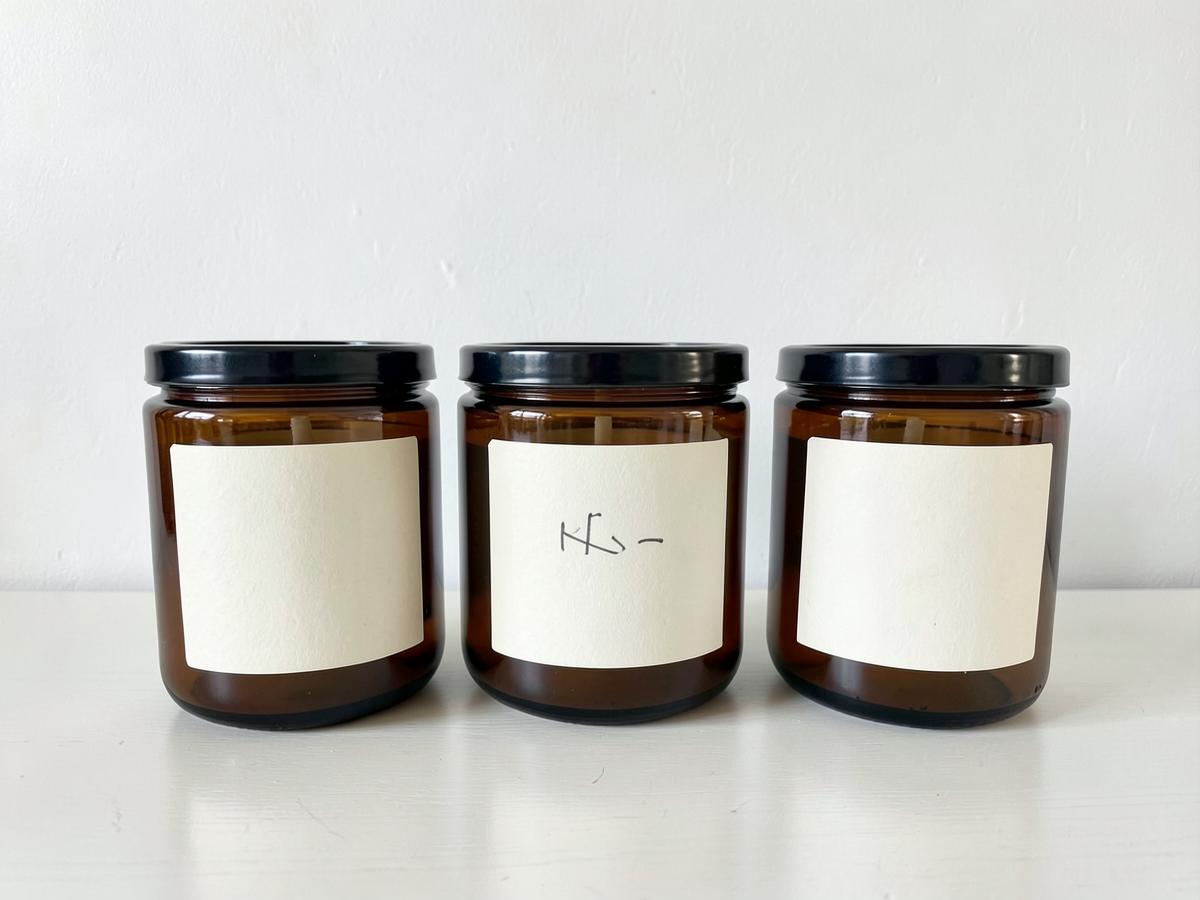 Source image attachedSource photo: three amber candle jars photographed against a plain wall
AmmarAI renders
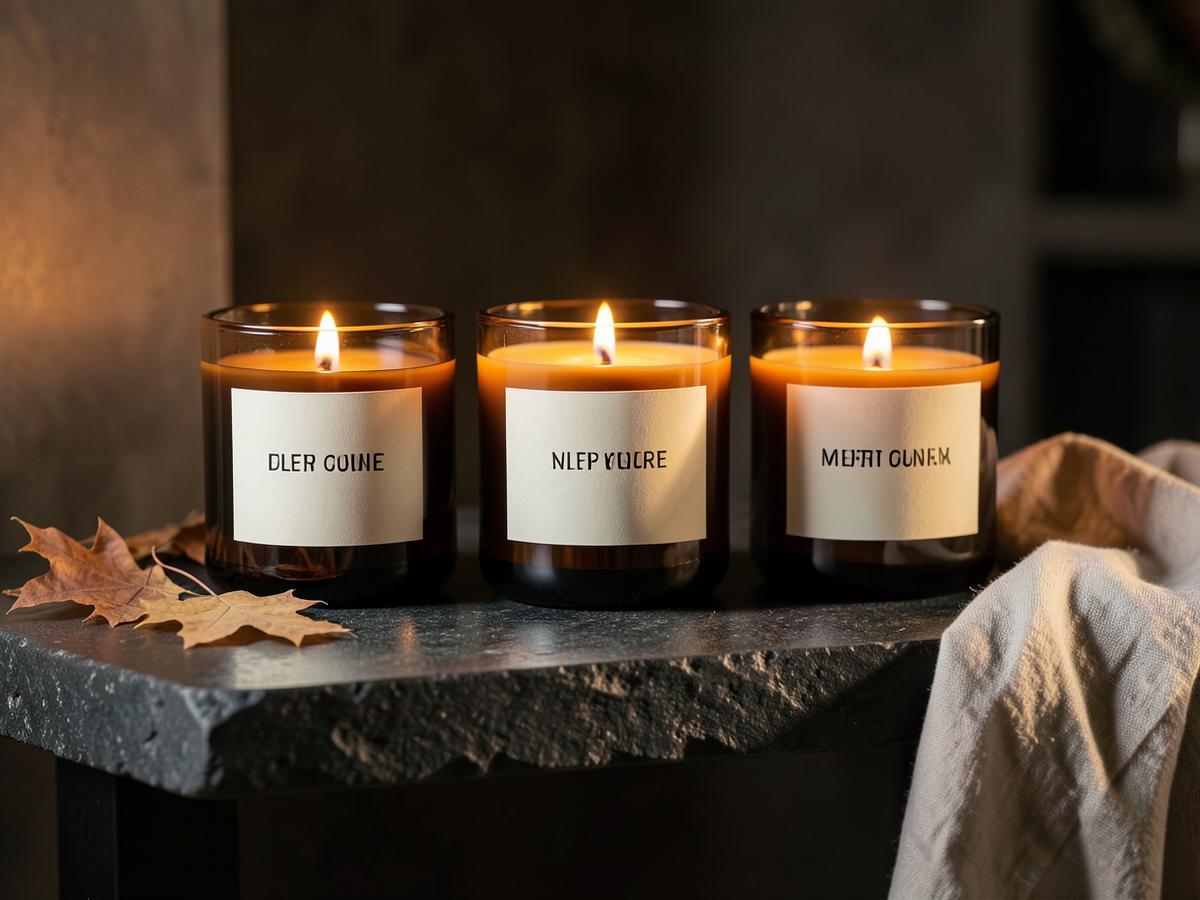
Sample shoot — the same candle range styled as a warm autumn campaign with professional light and props.
The same three candles styled on dark stone with warm flame light, autumn leaves and soft linen — a polished seasonal campaign that preserves the jars and labels.
Candle range to autumn campaign
Input
One plain phone photo of three amber candle jars against a white wall. Direction: warm autumn interior, premium editorial light.
Output
The same three candles styled on dark stone with warm flame light, autumn leaves and soft linen — a polished seasonal campaign that preserves the jars and labels.
Skincare summer refresh
Input
One plain photo of a forest-green skincare pump bottle. Direction: clean summer campaign, poolside sunlight, fresh botanical details.
Output
The same bottle on pale stone beside clear water, finished with realistic sunlight, water reflections and fresh leaves for a premium seasonal advert.
Key features
What the tool gives you
Product fidelity first
Shape, label, texture and colour are preserved from your photo; only the world around the product is generated.
Scene templates and custom prompts
Start from one of the ready-made scene template categories or describe the exact set you have in mind, down to the surface and time of day.
Editable after generation
Every image stays editable — regenerate variations, change the style, swap the background or add an angle without losing the original.
Prompt or image to start
Upload a product photo, describe the shot in words, or do both — composition, lighting, reflections and shadows are handled for you.
Consistent across a range
Lock a lighting and colour recipe and apply it to every product so the catalogue reads as one shoot.
Every ratio you need
Product page, marketplace square, story, wide banner and print, generated together rather than cropped later.
Believable contact and shadow
Products sit on surfaces properly, with contact shadows and reflections that match the scene light.
Fast iteration
Change the season, the surface or the mood in a sentence and regenerate in seconds instead of rebooking a studio.
Who it is for
People who get the most from this
E-commerce sellers
Marketplace listings need many angles and scenes per SKU, and reshoots kill margin.
Makers and small brands
Get campaign-grade imagery without a studio day you cannot justify.
Agencies
Show clients three creative directions before anyone books a photographer.
Marketplaces and dropshippers
Turn identical supplier photos into imagery that looks like your brand, not everyone else's.
Workflows
Practical ways teams use it
Launch a product without a shoot
Photograph the sample on a table and have a full launch set — hero, lifestyle, detail, social — the same afternoon.
Seasonal refresh
Re-dress the same products for autumn, Christmas or summer without touching the products again.
Ad testing
Run five scenes against each other in paid social and keep the one that converts.
Tips that improve results
- Shoot the source photo in soft, even light — hard shadows in the original limit what the model can relight.
- Include the whole product with a little space around it; tight crops lose the silhouette.
- Name the surface and the light ("pale oak table, morning window light") for scenes that feel real.
- Pick one direction for the whole range before generating; consistency sells more than variety.
Mistakes worth avoiding
- Using a blurry or heavily compressed source and blaming the output.
- Generating scenes that imply features the product does not have.
- Mixing five visual styles across one collection page.
- Skipping a plain product shot — marketplaces still require one on white.
AI Product Photoshoot FAQ
Will my product still look exactly like my product?
Yes. The item is preserved from your photo — the generated part is the scene, light and shadow around it.
How good does the source photo need to be?
Sharp, evenly lit, whole product in frame, plain background if possible. A modern phone is more than enough.
Can I use these images commercially?
Yes — they are your product and your generated scenes, produced for your store, ads and listings.
Do marketplaces accept AI scenes?
Most accept lifestyle imagery as secondary images and require a plain main image, which the tool also produces.
Tutorial
How to use Fashion Studio
Create AI photoshoots, virtual try-on images, model swaps, edits and fashion videos with AmmarAI’s Fashion Studio workflow. Step-by-step guide with screenshots.
Read the tutorialTutorial
How to create product photos with AI Photoshoot
Create studio-quality product images with AI Photoshoot: custom prompt shoots, template scenes, background replacement and image editing, step by step.
Read the tutorialRelated
Tools that pair well with this
AI Image Editor
Edit a photo by describing the change — swap the background, remove objects, extend the frame, fix the light.
AI ImageAI Image Pro
A full image studio: generate from text, edit with a brush, keep one character or style consistent, swap backgrounds, upscale and export every size you need.
AI ImageAI Fashion Studio
Put a garment on a model without a shoot — same clothes, real fit, any model, any setting.
AI ImageAI Creative Suite
A drag-and-drop design editor with AI image generation — ads, social posts, invitations and banners that all match.
AI VideoAI Image to Video
Animate a still image into a short clip with camera movement and controlled motion.
Related workflows
See how this tool fits into real work
E-commerce Sellers
AI for E-commerce
Write product descriptions, titles, and listing copy across a whole catalog without hiring a copywriter per SKU.
Marketing Teams
AI for Marketing Teams
Turn a single campaign brief into ads, emails, and landing pages without the usual back-and-forth.
Small Business Owners
AI for Small Business
Write website copy, ads, and customer emails yourself, without hiring an agency you can't yet afford.
Try the AI Product Photoshoot free
One AI for everything you create. Start on the free plan and upgrade only when the volume demands it.