
AI Voice21 min read
Branded Content Teams: 5 Step Structured Data for AI, One Workspace
Scale branded content with structured data for AI. Create voice docs, JSON schemas, and validation to run 5 step bulk batches in one integrated workspace.

Branded Content Teams: 5 Step Structured Data for AI, One Workspace
Structured data for AI means the organized content assets and metadata controlling what a model generates: a voice document that codifies your rules, prompt templates that embed that voice in every call, and a fielded schema (JSON or CSV) that maps outputs into your publishing system. The fastest path in is a three-part build: write the voice document, template the prompts around it, then define the schema you’ll generate against. If you want to start today, export a product or content CSV, or draft a condensed two to four-page voice document, and run one small batch before you commit to scale.
TL;DR:
- Structured data ensures batch consistency by anchoring outputs to real input attributes and reducing model inventiveness.
- Regular quarterly audits of generated content help prevent voice drift and identify upstream data issues early.
- Using a fielded schema with strict required fields and clear attribute grounding minimizes hallucinated claims and inconsistent formatting.
- Validating model outputs after generation, instead of prompt-level filtering, significantly reduces false positives and improves reliability.
- Building workflows inside integrated platforms like Ammarai streamlines setup, promotes shared rules, and maintains brand voice across large content volumes.
Table of Contents
- Why Structured Inputs Matter for Brand Consistency and Speed
- Core Components: Voice Document, Prompt Templates, and Fielded Schema
- The Bulk Workflow: Prepare, Generate, Validate, Import
- Validation and Guardrails That Actually Hold Up
- Keeping Voice Consistent as Volume Grows
- How an Integrated AI Workspace Applies This Guide
- Structured Data Formats You’ll Actually Encounter
- What Structured Inputs Actually Buy You
- Designing a Schema That Actually Improves Output
- Fitting Structured Data Into Your AI Pipeline
- Where Teams Get This Wrong
- Where Structured Data for AI Shows Up in Practice
- The Overrated Part of This, and What Actually Matters
- Start Building Structured Workflows With Ammarai
- Sources
- FAQ
Why Structured Inputs Matter for Brand Consistency and Speed
Feeding a model loose instruction and hoping for consistency is how teams end up rewriting half their output. Structure works because it removes ambiguity at the exact point where models improvise: when they don’t know your rules, they invent tone, and when they don’t know your facts, they invent details. Attaching a source_attribute to every generated claim forces the model to point back to real input data instead of guessing, a pattern that catches invented product features before they ever reach a customer, according to the 500-SKU bulk workflow breakdown from HowAIWorks.ai.
Once structure is in place, the payoff shows up fast:
- Bulk batches publish in hours instead of days because nobody is manually rewriting tone on every piece.
- Meta fields, bullet counts, and formatting stay consistent across hundreds of assets without a human touch on each one.
- Editors spend fewer rounds fixing voice drift and more time on actual quality review.
Structure won’t fix everything, though. It can’t supply domain expertise your writers don’t have, it can’t validate legal claims, and it can’t invent data that was never in your source file. If your product feed is missing half its attributes, no schema will conjure them.
Core Components: Voice Document, Prompt Templates, and Fielded Schema
Three artifacts do almost all the work. Skip one and the system degrades somewhere downstream.
The voice document is the operational rulebook: banned words, sentence length preferences, paragraph rhythm, and five or six gold-standard examples of the tone done right. Full versions run 8 to 12 pages because vague notes don’t survive contact with a model at scale, a finding backed by guidance on maintaining brand voice across large volumes of AI content. For actual generation calls, you don’t paste the whole document. You append a condensed two to four page version directly into the prompt.
Prompt templates follow a four-part structure every time: voice context (the condensed doc), content-type instructions (what format, what length), the specific topic or angle, and one or two worked examples. That combination, sometimes running 2,000 to 5,000 words once fully assembled, is what keeps output stable across different underlying models rather than just one.
The fielded schema is what makes bulk generation possible at all. Define JSON properties that map directly to your CSV columns: title, short_description, bullets[] with a source_attribute on each one, long_description, meta_description, and a template_id field for routing. This is the same pattern used in reliable 500 SKU bulk product-description runs, and it turns an open-ended writing task into a field-mapping problem a machine can check.
Pro Tip: Store your condensed voice document as a reusable snippet, not a copy-pasted block. When you update your voice rules, you want that change to propagate to every template automatically, not require you to hunt down twelve separate prompt files.
The Bulk Workflow: Prepare, Generate, Validate, Import
Running your first batch safely means treating it as a pipeline with checkpoints, not a single button press. Skipping steps is exactly how teams end up importing 400 broken product pages overnight.
- Export and audit your source data. Pull your PIM or CSV file and check which rows have complete attributes. Flag anything missing key fields for manual review before it ever reaches generation, a step that caught a large share of would-be hallucinations in a 50,000-item catalog project.
- Define your JSON schema and template routing. Assign template variants deterministically with something like
templates[hash(sku) % N], so repeated runs stay reproducible and phrasing doesn’t repeat itself across similar items. - Run batch generation through the API. Collect structured JSON responses rather than freeform text, since batch calls with schema-locked outputs are both cheaper and more reliable than one-off UI generations for anything catalog-sized.
- Validate every output programmatically. Check schema compliance, confirm each bullet’s
source_attributetraces back to real input data, and enforce length bounds. Block or flag anything that fails rather than letting it slide through. - Stage before you publish. Import to a staging environment first, spot-check a sample of around 10 pages by eye, then push to production with a
run_idattached so you can roll back cleanly if something’s wrong, a safeguard highlighted in the same bulk workflow research.
The teams that skip step 4 are the ones who find out about problems from a customer complaint instead of a validation log. Build the check before you need it, not after.
Validation and Guardrails That Actually Hold Up
Guardrails fail most often when they’re built backward: trying to police a prompt before generation happens, rather than checking what actually came out. Generate first, then validate the output, an architecture that avoids the false positives that come from screening prompts themselves. A voice document that legitimately mentions a competitor’s name for comparison purposes will trip a naive input filter every time; checking the finished output avoids that entirely.
A few concrete checks belong in every pipeline:
- Attribute grounding on every bullet: if a claim can’t be traced to a
source_attributein the input row, it gets flagged withomitted_because_unknowninstead of published as fact. - Regex-based checks for banned phrases and words your voice document explicitly forbids.
- Near-duplicate detection to catch when a template produces suspiciously similar output across different SKUs.
- Schema and length validation to confirm every required field is present and within bounds.
None of this replaces human review entirely. It reduces what humans need to look at down to genuine edge cases, and it gives you a failure log you can act on instead of a pile of unreviewed content nobody trusts.
Pro Tip: Route flagged content into a separate manual review queue rather than a generic error log. If a human has to dig through raw JSON to find out what failed, they’ll stop checking within a week.
Keeping Voice Consistent as Volume Grows
Structure that works at 50 pieces a month can quietly fail at 500 if nobody’s watching for drift. Run a quarterly voice audit: pull a sample of recent output and compare it side by side against your gold examples. If the sentence rhythm has drifted or banned words are creeping back in, that’s your signal to update the voice document, not just the prompts.
A handful of practices keep this manageable rather than becoming a full time job:
- Assign templates deterministically and log a
run_idwith every batch, so any output can be traced back to exactly what generated it. - Track the percentage of outputs blocked by guardrails over time. A rising block rate usually means your source data quality is slipping, not that your model got worse.
- Watch the missing-required-fields rate as a leading indicator of upstream data problems.
- Check for repetition at the phrase level (a simple top trigram check catches templates that have started sounding identical across different products).
None of this requires a dedicated data science team. It requires someone checking a dashboard on a schedule and treating drift as a maintenance task, the same way you’d treat a broken link check.
How an Integrated AI Workspace Applies This Guide
Building all three components separately, voice rules in one doc, prompts in another tool, schema logic hand coded, is exactly the overhead that makes teams abandon structured workflows halfway through. An integrated workspace like Ammarai’s AI Personas lets you save your voice rules as a reusable persona that attaches to every generation call automatically, instead of pasting a condensed doc into each prompt by hand.
For source material, the Document Analyzer can pull rules and gold examples straight out of existing brand guidelines, which shortcuts the voice-document drafting step considerably. From there, a bulk product-description job looks like: build a persona from your voice rules, define your JSON schema fields, run the batch, and stage the output for review before anything touches your live site. That’s the workflow this guide describes, running inside a single integrated tool instead of several separate ones.
Structured Data Formats You’ll Actually Encounter
Most teams building AI content pipelines will bump into a few recurring formats, and it helps to know what each one is actually for before you pick one.
JSON is the workhorse for AI-generated content because it maps cleanly to programming objects: nested arrays for bullets, string fields for descriptions, and strict typing that a validator can check mechanically. It’s what almost every batch API call returns and what almost every import script expects.
JSON-LD adds semantic linking on top of plain JSON, tying fields to shared vocabularies so different systems can interpret the same data the same way. It’s more common in search-indexing contexts than in the content-generation workflows this guide covers, but the underlying idea, giving each field an unambiguous meaning, is exactly why a fielded schema for AI generation works better than freeform prose.
CSV remains the format most marketing and e-commerce teams actually live in, because it’s what spreadsheets, PIM systems, and bulk import tools speak natively. The practical move is treating CSV as your interchange format: export from CSV, generate into JSON for the strict validation it allows, then flatten back to CSV for import.
RDF and formal ontology-based formats show up more in large enterprise knowledge graphs than in day-to-day branded content work. For a marketing team running bulk description or ad-copy jobs, the meaningful choice is almost always between JSON for generation and CSV for storage and import, not which formal markup standard to adopt.
Pick whichever format your existing tools already speak fluently. A schema that fights your PIM system’s native export format creates friction every single batch run, not just the first one.
What Structured Inputs Actually Buy You
The benefit isn’t abstract consistency. It’s fewer edit cycles, faster turnaround, and output you can trust without reading every line yourself.
Teams that skip structure end up reviewing everything, because nothing about the output is predictable. Teams that build a voice document, template library, and schema up front flip that ratio: most output passes validation and needs only a skim, and review time concentrates on the flagged exceptions instead of the whole batch.
There’s a speed benefit that compounds, too. A single well-built prompt template can run against hundreds of rows in one batch call. Compare that to a single-item UI workflow where someone manually adjusts tone on every piece, and the time difference isn’t marginal, it’s the difference between a project finishing in an afternoon versus a week.
Structured inputs also make quality measurable instead of subjective. When output is unstructured prose, “does this sound on brand” is a judgment call that varies by reviewer. When output has fields, a missing meta_description or an over-length bullet is a fact you can check with a script, not an opinion you argue about in a Slack thread.
The last benefit is durability. A voice document and schema outlive any single AI model. When you switch providers or a model gets updated, your structured inputs stay valid. You’re not rebuilding your brand consistency from scratch every time the underlying model changes, you’re just pointing the same rules at a different generation engine.
Designing a Schema That Actually Improves Output
A schema’s job is to make ambiguity visible before generation happens, not to catch problems after the fact.
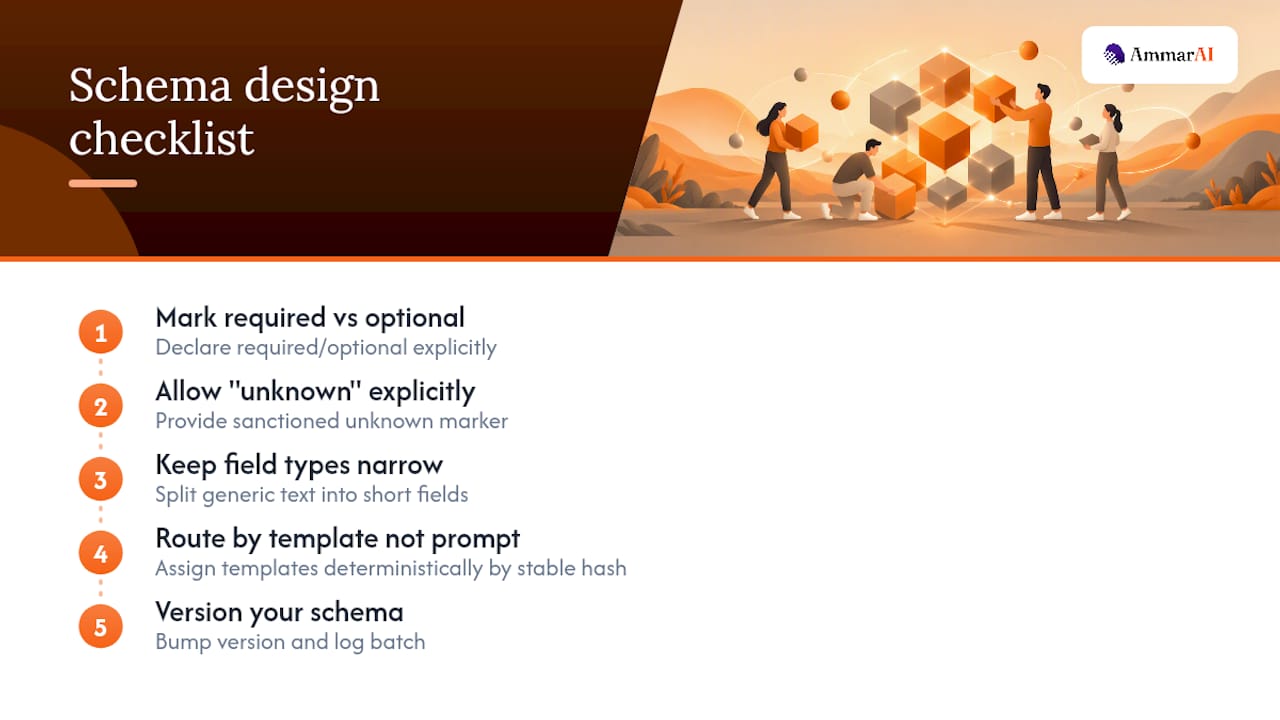
Start with required versus optional fields, and be strict about it. If short_description is required but long_description is optional, say so explicitly in the schema rather than leaving the model to guess whether skipping it is acceptable. Ambiguous requirements produce ambiguous compliance.
Build in a place for the model to admit what it doesn’t know. The omitted_because_unknown pattern, used alongside source_attribute tagging on generated bullets, gives the model an explicit, sanctioned way to leave a gap rather than inventing a plausible-sounding fact to fill it. That single design choice does more to prevent hallucinated product claims than any amount of prompt-level pleading for accuracy.
Keep field types narrow and specific. A generic description field invites the model to write however it wants. Splitting that into short_description (one sentence, character-limited) and bullets[] (an array of three to five items, each tied to a source_attribute) gives the model a much smaller decision space per field, and smaller decision spaces produce more consistent output.
Route by template, not by prompt tweaking. Rather than hand-editing prompts for different content categories, define multiple template variants and assign them deterministically, using a stable hash of a product ID, for instance, so the same input always routes to the same template on every run. That reproducibility matters enormously once you’re debugging why batch 47 looks different from batch 12.
Finally, version your schema. When you add a field or change a requirement, bump a version number and log which version generated which batch. Six months from now, when you’re troubleshooting inconsistent old content, that version tag tells you immediately whether the problem is the schema or the model.
Fitting Structured Data Into Your AI Pipeline
The pipeline shape that works, across product descriptions, ad copy, and social captions alike, is consistent: extract, retrieve context, generate, validate, import.
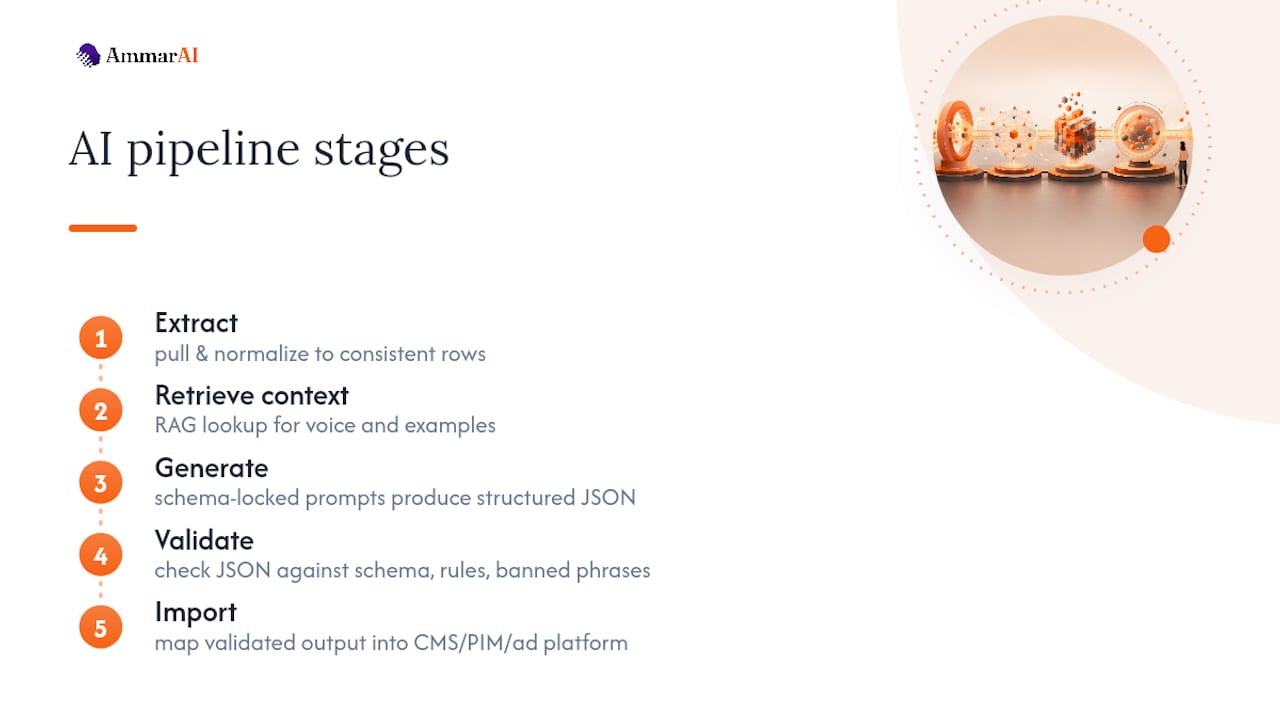
Extraction pulls clean data out of wherever it currently lives, a PIM export, a supplier CSV, a spreadsheet of campaign briefs, and normalizes it into a consistent row format before anything touches a model. Skipping this step is the single most common reason bulk generation projects produce inconsistent results, since a model fed inconsistent input structure will produce inconsistent output structure no matter how good the prompt is.
Context retrieval, sometimes built as a simple RAG (retrieval-augmented generation) lookup against a brand knowledge base, pulls in the specific voice rules and prior examples relevant to that generation call rather than stuffing the entire brand guide into every prompt. This is how a pipeline that transforms raw supplier data into on-brand product listings keeps prompts lean while still staying grounded in brand context.
Generation runs against the batch API using your schema-locked prompt templates, producing structured JSON rather than freeform text. This is the step where template routing and voice context actually get applied.
Validation checks the generated JSON against your schema, your attribute-grounding rules, and your banned-phrase list, before anything reaches a human reviewer or a live system.
Import takes validated output and maps it into your CMS, PIM, or ad platform, ideally through staging first. The pipeline only works end to end if every step outputs a format the next step can consume without manual reformatting, which is exactly why locking a shared JSON schema early saves so much rework later. Teams building this kind of pipeline from scratch often find a resource like Vetros, a data product platform for collecting and validating structured data, useful for the extraction and validation layers specifically.
Where Teams Get This Wrong
The most common failure isn’t a bad prompt. It’s skipping the audit step and assuming source data is clean when it isn’t.
Feeding a model a product row with three missing attributes and no flag for it produces a description that fills those gaps with plausible-sounding invention. The fix isn’t a better prompt, it’s catching the gap during the export and audit step, before generation ever happens, and either filling it manually or explicitly flagging it for omitted_because_unknown handling.
A second common mistake is writing a voice document once and never revisiting it. Voice drift is real and gradual: small departures compound over hundreds of generations until the two hundredth blog post barely resembles the tone of the first. Quarterly audits catch this before customers do.
A third mistake is building guardrails that check prompts instead of outputs, which produces a steady stream of false positives whenever a legitimate brand term happens to trip a keyword filter. Decoupling generation from validation, checking what came out rather than policing what went in, avoids this entirely and lets guardrails focus on catching genuine problems instead of blocking normal work.
Best practice across all of this comes down to a short list: audit before you generate, ground every claim in a real attribute, validate output rather than input, stage before you publish, and revisit your voice document on a schedule rather than treating it as a one-time document.
Where Structured Data for AI Shows Up in Practice
E-commerce catalogs are the clearest case: a retailer with several thousand SKUs and inconsistent supplier descriptions can normalize that data, run it through a schema-locked batch process, and produce on-brand descriptions for an entire catalog in a fraction of the time manual rewriting would take.
Content agencies managing multiple client accounts face a different version of the same problem: each client has a distinct voice, and mixing them up is a real risk when producing volume. A separate voice document and persona per client, run through the same underlying schema and validation pipeline, keeps client accounts from bleeding into each other even when the same team is producing content for all of them.
Social media teams publishing across multiple platforms use structured templates to keep a consistent brand voice while adjusting format, length, and tone per platform automatically, rather than manually rewriting the same core message five different ways.
Marketing teams running localized campaigns use the same schema-and-template pattern across languages and regions, swapping the topic and locale fields while keeping the voice document and validation rules constant, so a campaign feels consistent everywhere it runs even when the specific wording varies market to market.
In each case, the pattern is identical even though the content type differs: a structured voice foundation, a template library that embeds it, a schema that enforces fielded output, and validation that catches what generation gets wrong before a human ever has to.
The Overrated Part of This, and What Actually Matters
Most advice on this topic obsesses over prompt engineering, finding the perfect phrasing, the ideal few-shot example count, when the real leverage sits somewhere else entirely: the quality of your source data and the discipline of your validation layer. A brilliant prompt fed a spreadsheet with missing attributes still produces plausible-sounding fiction. A mediocre prompt fed clean, complete data and checked by a solid validator produces usable output nine times out of ten.
The conventional advice to “just write a great prompt” also undersells how much a fielded schema does on its own. Forcing a model to fill specific typed fields, rather than write open prose, narrows its decision space dramatically. That constraint does more consistency work than tone instructions ever will.
If you’re starting from zero, prioritize in this order: audit your source data honestly first, build the schema second, write the voice document third, and treat prompt wording as the last, smallest lever you pull. Teams that reverse this order spend weeks polishing prompts against messy data and wonder why output still drifts.
— Ahmed
Start Building Structured Workflows With Ammarai
This platform is built for exactly the workflow this guide describes: one workspace where your voice rules, prompt templates, and bulk generation live together instead of scattered across separate tools and folders. Users get unified history across every generation, a consistent brand voice applied automatically through reusable personas, and shared workspaces so teams work from the same rules instead of reinventing them per project.

If you’re testing this for the first time, start small. Build a persona from your voice document, run a batch of ten or twenty items through bulk generation, and check how much manual editing survives contact with your validation checks. The Free plan is enough to prototype that first batch before you commit to anything larger, and the Starter, Professional, and Ultimate tiers scale up generation limits and team seats as your bulk workflow grows. Review the plan details, pick the tier that matches your current volume, and run your first structured batch this week.
Sources
The workflow in this guide draws directly on practitioner writing about maintaining brand voice consistency across large volumes of AI content, the 500 SKU bulk product-description workflow from HowAIWorks.ai, and a firsthand account of building a pipeline that turns supplier data into on-brand listings. For teams building the extraction and validation layer themselves, Vetros covers the data-product side in more technical depth. Inside Ammarai, the AI Agent Builder page details automation options for running these workflows end to end.
- Brand Voice + AI: Consistency Across 100+ Posts in 2026
- Howaiworks
- I Built a Pipeline That Turns Messy Supplier Data Into On-Brand Product Listings — Automatically | Intelligent Integrations
FAQ
What Is Structured Data for AI Content Generation?
It’s the set of organized inputs, a voice document, prompt templates, and a fielded schema, that control how an AI model generates branded content. Unlike a single freeform prompt, these assets let you generate hundreds of consistent pieces because the rules and required fields are locked in advance.
Do I Need a JSON Schema If I’m Only Generating a Few Pieces a Week?
Probably not. Schemas earn their keep once you’re generating in batches of dozens or more, where manual consistency checking becomes impractical. Below that volume, a solid voice document and prompt template are usually enough.
How Often Should I Check for Voice Drift?
A quarterly audit, comparing a sample of recent output against your original gold examples, catches most drift before it becomes noticeable to readers, based on guidance on maintaining consistency across high content volume. Waiting longer than that risks letting small departures compound.
What’s the Difference Between Validating Input and Validating Output?
Validating input means screening a prompt before generation, which risks false positives when legitimate brand language trips a filter. Validating output means checking what the model actually produced, a pattern that avoids blocking legitimate content while still catching real problems.
Can Ammarai Handle Bulk Generation With a Custom Schema?
Ammarai supports bulk generation through its workspace tools, with brand voice enforced through reusable Personas rather than manual prompt pasting. Current plan details and generation limits are listed on the pricing page.
Recommended
Recommended for you
- Broadcast Quality in Minutes: AI Voiceovers for Creators
Practical workflow for creators and marketers to produce broadcast quality AI voiceovers. Use SSML, manage latency, and keep a single brand voice in one...
- Automate YouTube Shorts in an Afternoon: Blueprint for Engineers
An engineer friendly blueprint to automate YouTube Shorts: every pipeline stage mapped to tools, a checklist, and a one workspace shortcut.
- Realtime Voice Chat: Talk Naturally With AI
Use AmmarAI's Realtime Voice Chat for natural spoken conversations, hands-free brainstorming, content planning, and idea development.
Tools to try next
- AI Voiceover & Voice Clone
Generate natural-sounding voiceovers in 150+ languages and dialects. Clone your own voice or choose from a large library of neural voices, with control over tone, speed, and emotion.
- Realtime Voice Chat
Talk out loud with AI and get spoken replies back, in a live back-and-forth conversation.
- Brand Voice
Define how your brand sounds once, and have every writing tool follow it.